---
title: Creating and using custom assessments
description: Learn how to create custom assessments and add them to your hiring processes and jobs.
---
[Skip to content](https://adpsupport.careerplug.com/creating-and-using-custom-assessments#main-content)
[Submit a Request](https://adpsupport.careerplug.com/kb-tickets/new?hsLang=en)
[![CP ADP Logo 2025.png\]](https://adpsupport.careerplug.com/hs-fs/hubfs/CP%20ADP%20Logo%202025.png?width=297&height=40&name=CP%20ADP%20Logo%202025.png)](https://adpsupport.careerplug.com?hsLang=en)
Open main navigation
Close main navigation
- [Submit a Request](https://adpsupport.careerplug.com/kb-tickets/new)
- [Get help now!](https://adpsupport.careerplug.com/help)
[Get help now!](https://adpsupport.careerplug.com/help?hsLang=en)
How can we help?
- There are no suggestions because the search field is empty.
1. [ADP Help Center](https://adpsupport.careerplug.com/?hsLang=en)
2. [Hiring Tools & Automations](https://adpsupport.careerplug.com/hiring-tools-automations?hsLang=en)
3. [Assessments](https://adpsupport.careerplug.com/hiring-tools-automations?hsLang=en#assessments)
# Creating and using custom assessments
Available with a CareerPlug [Hire](https://adpsupport.careerplug.com/benefits-of-your-careerplug-pro-subscription?hsLang=en) or [Grow](https://adpsupport.careerplug.com/benefits-of-a-careerplug-premium-subscription?hsLang=en) subscription.
Besides the Personality and Math/Verbal assessments included in your CareerPlug account, you have the ability to create and use your own custom assessments. Once you create a custom assessment, you'll need to associate it with a hiring process, and then add it to a job. After that, you can start inviting applicants to complete your custom assessments.
#### In this article:
- [Creating an assessment](https://adpsupport.careerplug.com/creating-and-using-custom-assessments#create)
- [Adding an assessment to a hiring process](https://adpsupport.careerplug.com/creating-and-using-custom-assessments#hp)
- [Adding an assessment to a job](https://adpsupport.careerplug.com/creating-and-using-custom-assessments#job)
### Creating the assessment
Navigate to **Settings \> Hiring Tools \> Assessments**.
%20(7.21.26)%20Navigation%20shown.png?width=670&height=194&name=Settings%2c%20Hiring%20Tools%2c%20Assessments%20(Nav%20bar%20minimized)%20(7.21.26)%20Navigation%20shown.png)
Click the **Create New Assessment** button.
%20(No%20navigation)%20(7.21.26)%20Pointed%20to%20new.png?width=670&height=212&name=Settings%2c%20Hiring%20Tools%2c%20Assessments%20(Nav%20bar%20minimized)%20(No%20navigation)%20(7.21.26)%20Pointed%20to%20new.png)
Give your new assessment a name. Next, click the **Add Question** button (to add a new assessment question) or the **Add Comment** button (to add assessment instructions or other comments).
%20(7.21.26).png?width=669&height=338&name=SEttings%2c%20Hiring%20Tools%2c%20Create%20New%20Assessment%20(Cropped)%20(7.21.26).png)
Here's what adding a comment looks like:
%20(7.21.26).png?width=596&height=423&name=Settings%2c%20Hiring%20Tools%2c%20Assessments%2c%20Add%20Comment%20(Unmarked)%20(7.21.26).png)
Here's what adding a question looks like:
%20(7.21.26).png?width=594&height=621&name=Settings%2c%20Hiring%20Tools%2c%20Assessments%2c%20Add%20Question%20(Unmarked)%20(7.21.26).png)
**Note:** These questions can be constructed much like prescreen questions. They can be scored, and an applicant's overall score on the entire assessment will be based on their answers to each scored question.
If you need to move questions and comments after you have added them, do so by clicking the **green up-and-down arrow icon** and dragging the question or comment to its desired location. When you are finished creating comments and questions and reordering them, click **Update Assessment**.
.png?width=670&height=278&name=Settings%2c%20Hiring%20Tools%2c%20Editing%20Assessments%20(7.21.26).png)
### Adding an assessment to a hiring process
Next, you'll need to add this new assessment to a hiring process in order for applicants who are in that process to be able to take it.
Navigate to **Settings (gear icon) \> Hiring Tools \> Hiring Process** to edit a hiring process.
Click the **pencil icon** to add the assessment to a hiring step.
%20(6.23.26)%20Point%20to%20edit.png?width=670&height=495&name=Settings%2c%20Hiring%20Tools%2c%20Hiring%20Process%20(Nav%20bar%20minimized)%20(6.23.26)%20Point%20to%20edit.png)
Click "Select" next to assessments, and turn on the toggle to add the assessment you just created to the hiring step. Click **Confirm**, then click **Save Changes** to update the hiring step, and then click **Save and Exit** to update the hiring process.

### Adding an assessment to a job
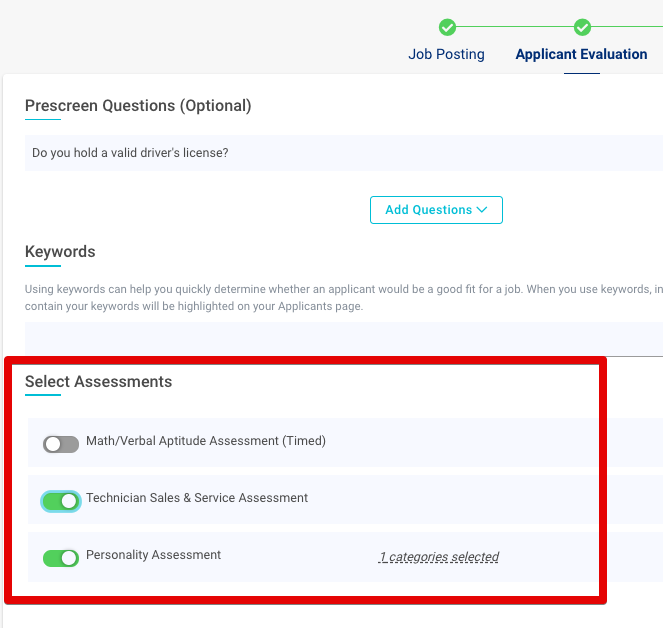
Now that you have created an assessment and associated it with a hiring process, new jobs you post that use this hiring process have the option to include this assessment as part of their hiring process. You can add this assessment to an existing job that uses the process you edited so that you have the option to have current applicants complete it.
You can add the assessment in the **Applicant Evaluation** section when you're posting or editing a job:
- [Getting Started](https://adpsupport.careerplug.com/getting-started?hsLang=en#main-content)
- [CareerPlug 101](https://adpsupport.careerplug.com/getting-started?hsLang=en#careerplug-101)
- [How To Hire](https://adpsupport.careerplug.com/getting-started?hsLang=en#how-to-hire)
- [Account Set Up](https://adpsupport.careerplug.com/account-set-up?hsLang=en#main-content)
- [About Your Account](https://adpsupport.careerplug.com/account-set-up?hsLang=en#about-your-account)
- [Billing](https://adpsupport.careerplug.com/account-set-up?hsLang=en#billing)
- [Configuring Your Account](https://adpsupport.careerplug.com/account-set-up?hsLang=en#configuring-your-account)
- [Locations](https://adpsupport.careerplug.com/account-set-up?hsLang=en#locations)
- [Your Careers Page](https://adpsupport.careerplug.com/account-set-up?hsLang=en#your-careers-page)
- [Notifications](https://adpsupport.careerplug.com/account-set-up?hsLang=en#notifications)
- [User Access](https://adpsupport.careerplug.com/account-set-up?hsLang=en#user-access)
- [Admin](https://adpsupport.careerplug.com/account-set-up?hsLang=en#admin)
- [Support](https://adpsupport.careerplug.com/support?hsLang=en#main-content)
- [Contacting Support](https://adpsupport.careerplug.com/support?hsLang=en#contacting-support)
- [Troubleshooting](https://adpsupport.careerplug.com/support?hsLang=en#troubleshooting)
- [Live Trainings](https://adpsupport.careerplug.com/support?hsLang=en#live-trainings)
- [Job Postings](https://adpsupport.careerplug.com/job-postings?hsLang=en#main-content)
- [About Your Jobs](https://adpsupport.careerplug.com/job-postings?hsLang=en#about-your-jobs)
- [Creating & Editing Job Postings](https://adpsupport.careerplug.com/job-postings?hsLang=en#creating-editing-job-postings)
- [Sponsoring Jobs](https://adpsupport.careerplug.com/job-postings?hsLang=en#sponsoring-jobs)
- [Passive Recruiting](https://adpsupport.careerplug.com/job-postings?hsLang=en#passive-recruiting)
- [Managing Your Jobs](https://adpsupport.careerplug.com/job-postings?hsLang=en#managing-your-jobs)
- [Sharing Your Jobs](https://adpsupport.careerplug.com/job-postings?hsLang=en#sharing-your-jobs)
- [Job Boards](https://adpsupport.careerplug.com/job-postings?hsLang=en#job-boards)
- [Applicant Flow](https://adpsupport.careerplug.com/job-postings?hsLang=en#applicant-flow)
- [Applicant Tracking](https://adpsupport.careerplug.com/applicant-tracking?hsLang=en#main-content)
- [Applicant Information](https://adpsupport.careerplug.com/applicant-tracking?hsLang=en#applicant-information)
- [Managing Applicants](https://adpsupport.careerplug.com/applicant-tracking?hsLang=en#managing-applicants)
- [Sorting & Filtering Applicants](https://adpsupport.careerplug.com/applicant-tracking?hsLang=en#sorting-filtering-applicants)
- [Contacting Applicants](https://adpsupport.careerplug.com/applicant-tracking?hsLang=en#contacting-applicants)
- [Interviewing Applicants](https://adpsupport.careerplug.com/applicant-tracking?hsLang=en#interviewing-applicants)
- [Applicant Activity](https://adpsupport.careerplug.com/applicant-tracking?hsLang=en#applicant-activity)
- [Hiring](https://adpsupport.careerplug.com/applicant-tracking?hsLang=en#hiring)
- [Applicant Experience](https://adpsupport.careerplug.com/applicant-tracking?hsLang=en#applicant-experience)
- [Hiring Tools & Automations](https://adpsupport.careerplug.com/hiring-tools-automations?hsLang=en#main-content)
- [Autopilot](https://adpsupport.careerplug.com/hiring-tools-automations?hsLang=en#autopilot)
- [Hiring Process](https://adpsupport.careerplug.com/hiring-tools-automations?hsLang=en#hiring-process)
- [Automations](https://adpsupport.careerplug.com/hiring-tools-automations?hsLang=en#automations)
- [Prescreen Questions](https://adpsupport.careerplug.com/hiring-tools-automations?hsLang=en#prescreen-questions)
- [Assessments](https://adpsupport.careerplug.com/hiring-tools-automations?hsLang=en#assessments)
- [Email & Text Messages](https://adpsupport.careerplug.com/hiring-tools-automations?hsLang=en#email-text-messages)
- [Scorecards](https://adpsupport.careerplug.com/hiring-tools-automations?hsLang=en#scorecards)
- [Offer Letters](https://adpsupport.careerplug.com/hiring-tools-automations?hsLang=en#offer-letters)
- [Templates](https://adpsupport.careerplug.com/hiring-tools-automations?hsLang=en#templates)
- [Integrations](https://adpsupport.careerplug.com/hiring-tools-automations?hsLang=en#integrations)
- [Other Tools](https://adpsupport.careerplug.com/hiring-tools-automations?hsLang=en#other-tools)
- [Reporting & Compliance](https://adpsupport.careerplug.com/reporting-compliance?hsLang=en#main-content)
- [Reporting](https://adpsupport.careerplug.com/reporting-compliance?hsLang=en#reporting)
- [Charts](https://adpsupport.careerplug.com/reporting-compliance?hsLang=en#charts)
- [Compliance](https://adpsupport.careerplug.com/reporting-compliance?hsLang=en#compliance)
- [FAQs & Integrations](https://adpsupport.careerplug.com/faqs-integrations?hsLang=en#main-content)
- [The CareerPlug + ADP Partnership](https://adpsupport.careerplug.com/faqs-integrations?hsLang=en#the-careerplug-adp-partnership)
- [Integrations](https://adpsupport.careerplug.com/faqs-integrations?hsLang=en#integrations)
- [What's New](https://adpsupport.careerplug.com/whats-new?hsLang=en#main-content)
- [Monthly Updates](https://adpsupport.careerplug.com/whats-new?hsLang=en#monthly-updates)
- [Account Changes](https://adpsupport.careerplug.com/whats-new?hsLang=en#account-changes)
[](https://adpsupport.careerplug.com?hsLang=en)
Handcrafted in Austin, Texas
© 2026 CareerPlug. All rights reserved.