---
title: What features are currently in Labs?
description: Learn about the features available to you right now in Labs, our early-access testing program.
---
[Skip to content](https://adpsupport.careerplug.com/current-labs-features#main-content)
[Submit a Request](https://adpsupport.careerplug.com/kb-tickets/new?hsLang=en)
[![CP ADP Logo 2025.png\]](https://adpsupport.careerplug.com/hs-fs/hubfs/CP%20ADP%20Logo%202025.png?width=297&height=40&name=CP%20ADP%20Logo%202025.png)](https://adpsupport.careerplug.com?hsLang=en)
Open main navigation
Close main navigation
- [Submit a Request](https://adpsupport.careerplug.com/kb-tickets/new)
- [Get help now!](https://adpsupport.careerplug.com/help)
[Get help now!](https://adpsupport.careerplug.com/help?hsLang=en)
How can we help?
- There are no suggestions because the search field is empty.
1. [ADP Help Center](https://adpsupport.careerplug.com/?hsLang=en)
2. [Getting Started](https://adpsupport.careerplug.com/getting-started?hsLang=en)
3. [CareerPlug 101](https://adpsupport.careerplug.com/getting-started?hsLang=en#careerplug-101)
# What features are currently in Labs?
Available with a CareerPlug [Hire](https://adpsupport.careerplug.com/benefits-of-a-careerplug-hire-subscription?hsLang=en) or [Grow](https://adpsupport.careerplug.com/benefits-of-a-careerplug-grow-subscription?hsLang=en) subscription.
CareerPlug Labs is an early-access program for clients eager to dive into the latest CareerPlug features before they become generally available. By joining this program, you can get a sneak peek at our latest innovations and play a pivotal role in refining our features by providing valuable feedback during development.
Learn about [Labs: The CareerPlug's Early-Access Initiative](https://adpsupport.careerplug.com/labs-the-careerplug-early-access-initiative?hsLang=en).
### How do I turn on Labs features?
From any page in your CareerPlug account, click the **Account (circle with initials) icon** in the top-right corner and select **Labs** from the drop-down menu.
Turning on a Labs feature is as easy as clicking the toggle to the right of any feature you want to test.
### What features are available in Labs?
New features are always being added to Labs. See below for more information on what’s currently available.
**AI Assistant**
The AI Assistant is designed to help you make better use of your CareerPlug account. Once enabled, this assistant can help you navigate your account, locate jobs or applicants, and provide guidance on the next steps in your hiring and onboarding. You can tThink of the AI Assistant as a guide to the full CareerPlug experience.
**Note**: The AI Assistant will never modify or reject applicants, make hiring decisions, delete records, or share your private hiring information.
**AI-Generated Prescreen Questions**
Prescreen questions are among the most powerful ways to improve applicant quality, but many hiring managers don’t know the right questions to ask. Instead of posting a job with weak prescreen questions (or worse, none), try using AI-Generated Prescreen Questions.
When creating or editing a job, CareerPlug can suggest three job-specific prescreen questions — based on the job description and best practices — that focus on common deal-breakers. Generate smarter prescreen questions instantly to filter out unqualified applicants faster so you can spend more time focusing on the right ones.
**AI Refine**
When you’re moving fast, it’s easy to make small mistakes. Turning on this Labs feature on will help you clean up typos, double-check the spelling of names, and correct grammar issues before an email or text gets sent.
**Interviews Tab**
Are you tired of scrolling through your dashboard or calendar to find your next interview? The new Interviews tab fixes interview visibility and lets you see all your interviews at once. You can also handle all of your scheduling changes right from this page!
**Chat Apply & Talent Community**
Chat Apply reduces friction in the application process, making applicants who click on your job more likely to actually apply. Interested candidates who aren't ready to apply or just want to express their interest can provide their contact information to your Talent Community, so you can proactively reach out to more people for future jobs.
**Note:** Chat Apply currentlydoes not support EEOC questions.
**Custom Dashboard Tiles**
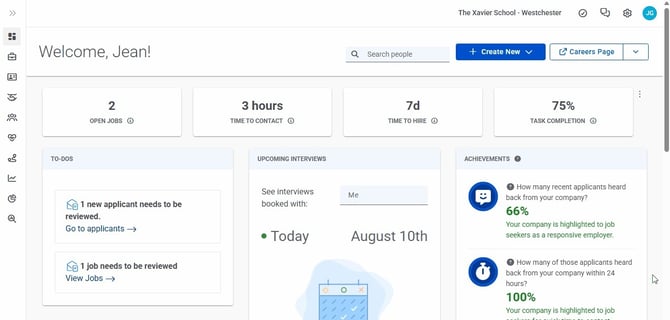
Your Dashboard offers a snapshot of the activity in and health of your CareerPlug account, hiring efforts, and employee retention. Now, you can customize exactly what data information you want to see on your Dashboard, providing quick insights into the data that matters most to you.
**Fast & Easy Job Posting**
If you’re looking to streamline posting a job or you’re overwhelmed by choices, the Fast & Easy Job Posting tool can help. It offers smart suggestions and takes the guesswork out of posting jobs.
**Message Center**
Send custom, trackable emails or texts directly to individual employees, your direct reports, or your entire team — all from one place. The Message Center lets you reach your employees without leaving CareerPlug, and keeps your message history organized for easy reference and accountability.
**New Document Builder**
Build and send employee documents for e-signature with an all-new, easier-to-use document builder. Assign a document to any employee through Workflows, they sign electronically, and it’s automatically saved back to their profile — same trusted e-signing process, now backed by a more flexible builder.
**New Hire Evaluation Survey**
Receive a quick survey about your satisfaction with a new employee 90 days after making the hire. This feedback will be used to help refine future hiring recommendations and improve the quality of your future hires. This information **will not** be shared with the new hire.
**Team Export**
Team Export is a game-changer for busy managers with many employees. It lets you download employee details in bulk via a CSV file so you can easily keep your personnel records up to date. You can also edit the CSV file and re-upload it to your CareerPlug account via the Team Import feature to make bulk updates to your roster.
**Team Import**
Team Import makes it easier than ever to keep your team roster up to date! Upload a CSV file with your employee details to update all of their information in CareerPlug at once — including adding anyone who wasn’t already in your account. This gives you a centralized location to store vital employee information and better access to the tools you need to manage and retain your team.
### Recently Graduated Labs Features
**One-Way Audio Interview**
This Labs feature lets you add the One-Way Audio Interview step to your hiring process. Candidates can record their answers to your custom audio questions on their own time, and hiring managers have the same flexibility when reviewing responses. This tool can give you early insight into a candidate's communication skills, thought process, and professionalism before you invest time in a full interview process.
Learn more about how [One-Way Audio Interviews](https://adpsupport.careerplug.com/using-one-way-audio-interviews?hsLang=en) work now that this feature has graduated!
### Frequently asked questions (FAQ)
**Q: Do I have to use Labs?**
**A:** No! Labs is a voluntary early-access program for clients eager to dive into the latest CareerPlug features before they become generally available. Labs exists so that power users can try new features and our developers can get real client feedback as they test and experiment. Labs is available to all accounts on Hire or Grow subscriptions, and you can opt in or out of any Labs feature at any time.
**Q: How can I tell what Labs features I have turned on right now?**
**A:** To see which Labs features you have turned on, click the **Account (circle with initials) icon** in the top-right corner of your screen, and select **Labs** from the drop-down menu. Any feature with a green toggle on your Labs page is currently enabled. If you’re not using — or don’t like — a feature, click the nearby toggle to turn it off.

You can also view the list of Labs features you’re using currently in the Labs Feedback and Help Form drawer. To access this, click the **Give Feedback** button in the top-right corner of the Labs page.
**Q: How do I give feedback on Labs features?**
**A:** If you have feedback, ideas, or thoughts on any of the Labs features you’ve tried tested, we would love to hear from you!
1. Click the **Account (circle with initials) icon** and select **Labs** from the drop-down menu.
2. Click the **Give Feedback** button in the top-right corner of the **Labs** page.
3. In the Labs Feedback and Help Form drawer, click the **Open Feedback Form** button.
You can also [use this link](https://share.hsforms.com/1wl6-8fPjTJ6F6PXYkU5fbg45iu0?__hstc=149923945.20294f563a4de8ea5739f0a031900bea.1787786632718.1787786632718.1787786632718.1&__hssc=149923945.3.1787786632718&__hsfp=abf19f86e15bb86f3d87011b4f668edb) to access our Labs feedback form directly.
**Q: Which users in my account have access to Labs features?**
**A:** Only Admin users in your account can toggle Labs features on and off. However, once you turn on a feature, it will be available across your entire account, and any user with the appropriate access level can try it out.
**Q: The Labs feature I love has graduated from Labs — what does that mean?**
**A:** First: thank you for helping us test a feature that made the cut and was fully released! Your time is appreciated.
A feature graduating from Labs means it was successful enough to justify a full rollout to all users — and you played a part in that. What happens next will depend on the specific feature, and what plan you’re on.
While a feature is in Labs, accounts with a Hire or Grow subscription can use it at no additional cost. This is so we can get as many active accounts and users as possible to test our new functionality. Once a feature graduates from Labs, it may no longer be included in your current plan. You will always be notified before a feature graduates, and any prior usage will be exempt from billing.
Your use of Labs features is governed by our [Terms of Service](https://app.careerplug.com/home/terms/).
- [Getting Started](https://adpsupport.careerplug.com/getting-started?hsLang=en#main-content)
- [CareerPlug 101](https://adpsupport.careerplug.com/getting-started?hsLang=en#careerplug-101)
- [How To Hire](https://adpsupport.careerplug.com/getting-started?hsLang=en#how-to-hire)
- [Account Set Up](https://adpsupport.careerplug.com/account-set-up?hsLang=en#main-content)
- [About Your Account](https://adpsupport.careerplug.com/account-set-up?hsLang=en#about-your-account)
- [Billing](https://adpsupport.careerplug.com/account-set-up?hsLang=en#billing)
- [Configuring Your Account](https://adpsupport.careerplug.com/account-set-up?hsLang=en#configuring-your-account)
- [Locations](https://adpsupport.careerplug.com/account-set-up?hsLang=en#locations)
- [Your Careers Page](https://adpsupport.careerplug.com/account-set-up?hsLang=en#your-careers-page)
- [Notifications](https://adpsupport.careerplug.com/account-set-up?hsLang=en#notifications)
- [User Access](https://adpsupport.careerplug.com/account-set-up?hsLang=en#user-access)
- [Admin](https://adpsupport.careerplug.com/account-set-up?hsLang=en#admin)
- [Support](https://adpsupport.careerplug.com/support?hsLang=en#main-content)
- [Contacting Support](https://adpsupport.careerplug.com/support?hsLang=en#contacting-support)
- [Troubleshooting](https://adpsupport.careerplug.com/support?hsLang=en#troubleshooting)
- [Live Trainings](https://adpsupport.careerplug.com/support?hsLang=en#live-trainings)
- [Job Postings](https://adpsupport.careerplug.com/job-postings?hsLang=en#main-content)
- [About Your Jobs](https://adpsupport.careerplug.com/job-postings?hsLang=en#about-your-jobs)
- [Creating & Editing Job Postings](https://adpsupport.careerplug.com/job-postings?hsLang=en#creating-editing-job-postings)
- [Sponsoring Jobs](https://adpsupport.careerplug.com/job-postings?hsLang=en#sponsoring-jobs)
- [Passive Recruiting](https://adpsupport.careerplug.com/job-postings?hsLang=en#passive-recruiting)
- [Managing Your Jobs](https://adpsupport.careerplug.com/job-postings?hsLang=en#managing-your-jobs)
- [Sharing Your Jobs](https://adpsupport.careerplug.com/job-postings?hsLang=en#sharing-your-jobs)
- [Job Boards](https://adpsupport.careerplug.com/job-postings?hsLang=en#job-boards)
- [Applicant Flow](https://adpsupport.careerplug.com/job-postings?hsLang=en#applicant-flow)
- [Applicant Tracking](https://adpsupport.careerplug.com/applicant-tracking?hsLang=en#main-content)
- [Applicant Information](https://adpsupport.careerplug.com/applicant-tracking?hsLang=en#applicant-information)
- [Managing Applicants](https://adpsupport.careerplug.com/applicant-tracking?hsLang=en#managing-applicants)
- [Sorting & Filtering Applicants](https://adpsupport.careerplug.com/applicant-tracking?hsLang=en#sorting-filtering-applicants)
- [Contacting Applicants](https://adpsupport.careerplug.com/applicant-tracking?hsLang=en#contacting-applicants)
- [Interviewing Applicants](https://adpsupport.careerplug.com/applicant-tracking?hsLang=en#interviewing-applicants)
- [Applicant Activity](https://adpsupport.careerplug.com/applicant-tracking?hsLang=en#applicant-activity)
- [Hiring](https://adpsupport.careerplug.com/applicant-tracking?hsLang=en#hiring)
- [Applicant Experience](https://adpsupport.careerplug.com/applicant-tracking?hsLang=en#applicant-experience)
- [Hiring Tools & Automations](https://adpsupport.careerplug.com/hiring-tools-automations?hsLang=en#main-content)
- [Autopilot](https://adpsupport.careerplug.com/hiring-tools-automations?hsLang=en#autopilot)
- [Hiring Process](https://adpsupport.careerplug.com/hiring-tools-automations?hsLang=en#hiring-process)
- [Automations](https://adpsupport.careerplug.com/hiring-tools-automations?hsLang=en#automations)
- [Prescreen Questions](https://adpsupport.careerplug.com/hiring-tools-automations?hsLang=en#prescreen-questions)
- [Assessments](https://adpsupport.careerplug.com/hiring-tools-automations?hsLang=en#assessments)
- [Email & Text Messages](https://adpsupport.careerplug.com/hiring-tools-automations?hsLang=en#email-text-messages)
- [Scorecards](https://adpsupport.careerplug.com/hiring-tools-automations?hsLang=en#scorecards)
- [Offer Letters](https://adpsupport.careerplug.com/hiring-tools-automations?hsLang=en#offer-letters)
- [Templates](https://adpsupport.careerplug.com/hiring-tools-automations?hsLang=en#templates)
- [Integrations](https://adpsupport.careerplug.com/hiring-tools-automations?hsLang=en#integrations)
- [Other Tools](https://adpsupport.careerplug.com/hiring-tools-automations?hsLang=en#other-tools)
- [Reporting & Compliance](https://adpsupport.careerplug.com/reporting-compliance?hsLang=en#main-content)
- [Reporting](https://adpsupport.careerplug.com/reporting-compliance?hsLang=en#reporting)
- [Charts](https://adpsupport.careerplug.com/reporting-compliance?hsLang=en#charts)
- [Compliance](https://adpsupport.careerplug.com/reporting-compliance?hsLang=en#compliance)
- [FAQs & Integrations](https://adpsupport.careerplug.com/faqs-integrations?hsLang=en#main-content)
- [The CareerPlug + ADP Partnership](https://adpsupport.careerplug.com/faqs-integrations?hsLang=en#the-careerplug-adp-partnership)
- [Integrations](https://adpsupport.careerplug.com/faqs-integrations?hsLang=en#integrations)
- [What's New](https://adpsupport.careerplug.com/whats-new?hsLang=en#main-content)
- [Monthly Updates](https://adpsupport.careerplug.com/whats-new?hsLang=en#monthly-updates)
- [Account Changes](https://adpsupport.careerplug.com/whats-new?hsLang=en#account-changes)
[](https://adpsupport.careerplug.com?hsLang=en)
Handcrafted in Austin, Texas
© 2026 CareerPlug. All rights reserved.