---
title: How a new user can obtain their sign in info
description: New users should automatically receive their sign in details. If, for some reason, they do not, here are a few ways to get them up and running in your CareerPlug account.
---
[Skip to content](https://adpsupport.careerplug.com/how-a-new-user-can-obtain-their-login-info#main-content)
[Submit a Request](https://adpsupport.careerplug.com/kb-tickets/new?hsLang=en)
[![CP ADP Logo 2025.png\]](https://adpsupport.careerplug.com/hs-fs/hubfs/CP%20ADP%20Logo%202025.png?width=297&height=40&name=CP%20ADP%20Logo%202025.png)](https://adpsupport.careerplug.com?hsLang=en)
Open main navigation
Close main navigation
- [Submit a Request](https://adpsupport.careerplug.com/kb-tickets/new)
- [Get help now!](https://adpsupport.careerplug.com/help)
[Get help now!](https://adpsupport.careerplug.com/help?hsLang=en)
How can we help?
- There are no suggestions because the search field is empty.
1. [ADP Help Center](https://adpsupport.careerplug.com/?hsLang=en)
2. [Account Set Up](https://adpsupport.careerplug.com/account-set-up?hsLang=en)
3. [User Access](https://adpsupport.careerplug.com/account-set-up?hsLang=en#user-access)
# How a new user can obtain their sign in info
When you [add a new user](https://adpsupport.careerplug.com/adding-a-user?hsLang=en) to CareerPlug, you'll receive a notification that they have been added to your account, and the user will automatically receive an email with sign in details.
If the user's email address is entered incorrectly, they will not receive this email or have the ability to set their password. You will first need to [update the user's email address and then send them a new reset password email](https://adpsupport.careerplug.com/changing-email-or-password?hsLang=en#anotheruser).
If a new user doesn't receive their sign in details for any reason, here are a couple of options to provide them:
### Option 1 — Send a new user a password reset email
1\. To send users a password reset email, navigate to the **Employee** page.
%20(NavEXP)%20(Standard)%20Cropped%2c%20pointed%20to%20employees.png?width=670&height=201&name=Dashboard%20(6.9.26)%20(NavEXP)%20(Standard)%20Cropped%2c%20pointed%20to%20employees.png)
2\. Find the employee whose password you want to reset and click their name, or click the **three dots icon** to the right of their name and select **View Profile**.
If you don't see the employee you're looking for, you can use the search box in the top right corner to search by name.
%20Search%2c%20View%20Profile.png?width=670&height=284&name=Employees%20Page%2c%20Three%20Dots%20(Nav%20Bar%20Minimized)%20Search%2c%20View%20Profile.png)
3\. Navigate to the user's **Settings** tab.
4\. Click the **Reset Password** button.
%20Reset%20Password.png?width=670&height=242&name=User%20Profile%2c%20Settings%2c%20Resend%20Password%20(Nav%20Bar%20Minimized)%20Reset%20Password.png)
Your new user will be sent a link to set their password.
### Option 2 — New user resets their own password
Any CareerPlug user can easily reset their own password.
1\. Navigate to the [CareerPlug sign-in page](https://app.careerplug.com/user/sign_in).
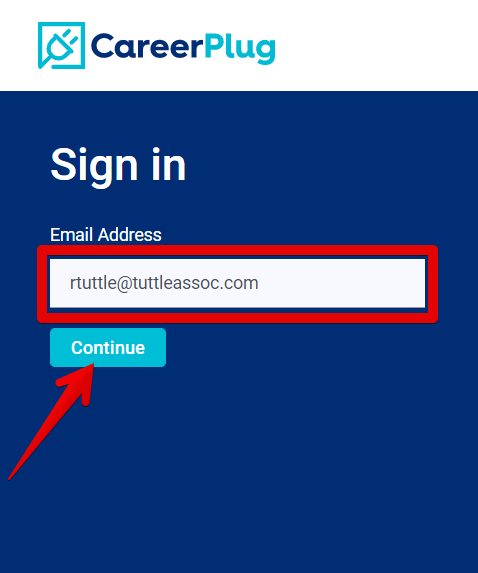
2\. Enter your **Email Address**.
3\. Click the **Continue** button.
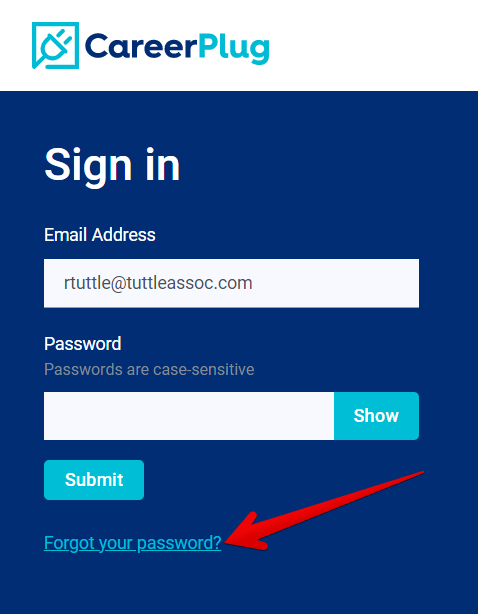
4\. Click the **Forgot your password?** link.
5\. Enter your **Email Address** again and click the **Submit** button.
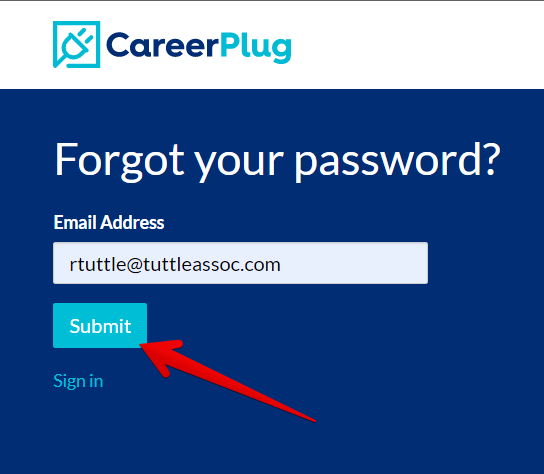
You will receive an email with a link to reset your password.
Password reset emails contain a link that expires after 10 hours. If you wait more than 10 hours to reset your password, you'll need to click the **Forgot your password?** link again start the password reset process over.
#### Did you encounter an error?
In order to protect our clients, their employees, and their applicants, we have implemented a new password policy. Any time a user sets a password (whether changing their existing password or setting a new one), we check the user's password against an independently verified database of exposed passwords. As the sophistication of bad actors and their tooling increases, it is important that we make constant improvements to maintain the security of our system and our clients' data.
If your chosen password was found previously in a data breach, an error message displays and you will need to choose a different password.
.png?width=450&height=162&name=Change%20Password%20%5BPassword%20found%20in%20breach%5D%20(3.30.26).png)
- [Getting Started](https://adpsupport.careerplug.com/getting-started?hsLang=en#main-content)
- [CareerPlug 101](https://adpsupport.careerplug.com/getting-started?hsLang=en#careerplug-101)
- [How To Hire](https://adpsupport.careerplug.com/getting-started?hsLang=en#how-to-hire)
- [Account Set Up](https://adpsupport.careerplug.com/account-set-up?hsLang=en#main-content)
- [About Your Account](https://adpsupport.careerplug.com/account-set-up?hsLang=en#about-your-account)
- [Billing](https://adpsupport.careerplug.com/account-set-up?hsLang=en#billing)
- [Configuring Your Account](https://adpsupport.careerplug.com/account-set-up?hsLang=en#configuring-your-account)
- [Locations](https://adpsupport.careerplug.com/account-set-up?hsLang=en#locations)
- [Your Careers Page](https://adpsupport.careerplug.com/account-set-up?hsLang=en#your-careers-page)
- [Notifications](https://adpsupport.careerplug.com/account-set-up?hsLang=en#notifications)
- [User Access](https://adpsupport.careerplug.com/account-set-up?hsLang=en#user-access)
- [Admin](https://adpsupport.careerplug.com/account-set-up?hsLang=en#admin)
- [Support](https://adpsupport.careerplug.com/support?hsLang=en#main-content)
- [Contacting Support](https://adpsupport.careerplug.com/support?hsLang=en#contacting-support)
- [Troubleshooting](https://adpsupport.careerplug.com/support?hsLang=en#troubleshooting)
- [Live Trainings](https://adpsupport.careerplug.com/support?hsLang=en#live-trainings)
- [Job Postings](https://adpsupport.careerplug.com/job-postings?hsLang=en#main-content)
- [About Your Jobs](https://adpsupport.careerplug.com/job-postings?hsLang=en#about-your-jobs)
- [Creating & Editing Job Postings](https://adpsupport.careerplug.com/job-postings?hsLang=en#creating-editing-job-postings)
- [Sponsoring Jobs](https://adpsupport.careerplug.com/job-postings?hsLang=en#sponsoring-jobs)
- [Passive Recruiting](https://adpsupport.careerplug.com/job-postings?hsLang=en#passive-recruiting)
- [Managing Your Jobs](https://adpsupport.careerplug.com/job-postings?hsLang=en#managing-your-jobs)
- [Sharing Your Jobs](https://adpsupport.careerplug.com/job-postings?hsLang=en#sharing-your-jobs)
- [Job Boards](https://adpsupport.careerplug.com/job-postings?hsLang=en#job-boards)
- [Applicant Flow](https://adpsupport.careerplug.com/job-postings?hsLang=en#applicant-flow)
- [Applicant Tracking](https://adpsupport.careerplug.com/applicant-tracking?hsLang=en#main-content)
- [Applicant Information](https://adpsupport.careerplug.com/applicant-tracking?hsLang=en#applicant-information)
- [Managing Applicants](https://adpsupport.careerplug.com/applicant-tracking?hsLang=en#managing-applicants)
- [Sorting & Filtering Applicants](https://adpsupport.careerplug.com/applicant-tracking?hsLang=en#sorting-filtering-applicants)
- [Contacting Applicants](https://adpsupport.careerplug.com/applicant-tracking?hsLang=en#contacting-applicants)
- [Interviewing Applicants](https://adpsupport.careerplug.com/applicant-tracking?hsLang=en#interviewing-applicants)
- [Applicant Activity](https://adpsupport.careerplug.com/applicant-tracking?hsLang=en#applicant-activity)
- [Hiring](https://adpsupport.careerplug.com/applicant-tracking?hsLang=en#hiring)
- [Applicant Experience](https://adpsupport.careerplug.com/applicant-tracking?hsLang=en#applicant-experience)
- [Hiring Tools & Automations](https://adpsupport.careerplug.com/hiring-tools-automations?hsLang=en#main-content)
- [Autopilot](https://adpsupport.careerplug.com/hiring-tools-automations?hsLang=en#autopilot)
- [Hiring Process](https://adpsupport.careerplug.com/hiring-tools-automations?hsLang=en#hiring-process)
- [Automations](https://adpsupport.careerplug.com/hiring-tools-automations?hsLang=en#automations)
- [Prescreen Questions](https://adpsupport.careerplug.com/hiring-tools-automations?hsLang=en#prescreen-questions)
- [Assessments](https://adpsupport.careerplug.com/hiring-tools-automations?hsLang=en#assessments)
- [Email & Text Messages](https://adpsupport.careerplug.com/hiring-tools-automations?hsLang=en#email-text-messages)
- [Scorecards](https://adpsupport.careerplug.com/hiring-tools-automations?hsLang=en#scorecards)
- [Offer Letters](https://adpsupport.careerplug.com/hiring-tools-automations?hsLang=en#offer-letters)
- [Templates](https://adpsupport.careerplug.com/hiring-tools-automations?hsLang=en#templates)
- [Integrations](https://adpsupport.careerplug.com/hiring-tools-automations?hsLang=en#integrations)
- [Other Tools](https://adpsupport.careerplug.com/hiring-tools-automations?hsLang=en#other-tools)
- [Reporting & Compliance](https://adpsupport.careerplug.com/reporting-compliance?hsLang=en#main-content)
- [Reporting](https://adpsupport.careerplug.com/reporting-compliance?hsLang=en#reporting)
- [Charts](https://adpsupport.careerplug.com/reporting-compliance?hsLang=en#charts)
- [Compliance](https://adpsupport.careerplug.com/reporting-compliance?hsLang=en#compliance)
- [FAQs & Integrations](https://adpsupport.careerplug.com/faqs-integrations?hsLang=en#main-content)
- [The CareerPlug + ADP Partnership](https://adpsupport.careerplug.com/faqs-integrations?hsLang=en#the-careerplug-adp-partnership)
- [Integrations](https://adpsupport.careerplug.com/faqs-integrations?hsLang=en#integrations)
- [What's New](https://adpsupport.careerplug.com/whats-new?hsLang=en#main-content)
- [Monthly Updates](https://adpsupport.careerplug.com/whats-new?hsLang=en#monthly-updates)
- [Account Changes](https://adpsupport.careerplug.com/whats-new?hsLang=en#account-changes)
[](https://adpsupport.careerplug.com?hsLang=en)
Handcrafted in Austin, Texas
© 2026 CareerPlug. All rights reserved.