---
title: Managing notification settings
description: This article covers how to change or update notification settings, change notification settings for just one user or the whole account, and how to customize notifications based on the jobs you are hiring for.
---
[Skip to content](https://adpsupport.careerplug.com/managing-notification-settings#main-content)
[Submit a Request](https://adpsupport.careerplug.com/kb-tickets/new?hsLang=en)
[![CP ADP Logo 2025.png\]](https://adpsupport.careerplug.com/hs-fs/hubfs/CP%20ADP%20Logo%202025.png?width=297&height=40&name=CP%20ADP%20Logo%202025.png)](https://adpsupport.careerplug.com?hsLang=en)
Open main navigation
Close main navigation
- [Submit a Request](https://adpsupport.careerplug.com/kb-tickets/new)
- [Get help now!](https://adpsupport.careerplug.com/help)
[Get help now!](https://adpsupport.careerplug.com/help?hsLang=en)
How can we help?
- There are no suggestions because the search field is empty.
1. [ADP Help Center](https://adpsupport.careerplug.com/?hsLang=en)
2. [Account Set Up](https://adpsupport.careerplug.com/account-set-up?hsLang=en)
3. [Notifications](https://adpsupport.careerplug.com/account-set-up?hsLang=en#notifications)
# Managing notification settings
Having trouble receiving our emails? Click here for help: [Troubleshooting Notification Emails](https://adpsupport.careerplug.com/troubleshooting-notification-emails?hsLang=en)
#### In this article:
- [Change notification settings across your entire account](https://adpsupport.careerplug.com/managing-notification-settings#account)
- [Change notification settings for just one user (including you!)](https://adpsupport.careerplug.com/managing-notification-settings#user)
- [Ensure a user gets notifications about people who apply to a specific job](https://adpsupport.careerplug.com/managing-notification-settings#specific)
- [Ensure someone who doesn't have access to your CareerPlug account gets a daily email about new applicants](https://adpsupport.careerplug.com/managing-notification-settings#access)
### Change notification settings across your entire account
You can change all of your applicant notification settings at once by navigating to **Settings (gear icon) \> My Organization \> User Notifications**. Use this page to disable all notifications for a specific role or across your whole account in a few seconds.

***Note:** Only Admin users can use this page.*
### Change the default email notification settings for a user (including you!)
Navigate to your **Employees** page.

Find the employee whose email address you want to change and click their name, or click the **three dots icon** on the right side of the page, and select **View Profile** from the menu.
If you don't see the employee you're looking for, you can use the search box in the top right corner to search by name.

Navigate to the user's **Settings** tab and click the **Edit** button in the top-right corner of the page.

Scroll down to the **Notifications** section of the Profile Settings page, and toggle the sliders on or off depending on which notifications you want the user to receive.
Some notification types may also let you specify the frequency of notifications, how users are notified (email vs. text), and what tasks or hiring steps to receive notifications about. These can be configured with the drop-down list or checkboxes below a notification type.
There are five notification sections:
- **New Text Messages**
- Get an email when the user receives a new text message
- **New Applicants**
- Daily Digest - get one email every morning with new applicants from the previous day
- Each Applicant - get an email for each new applicant
- **Applicant Tasks**
- Get an email any time an applicant completes a task
- Completed assessments - get an email when any applicant completes assessments
- Completed scorecards - get an email when someone completes a scorecard on the applicant
- **New Fast Track Applicants**
- Email - get an email for every new Fast Track applicant
- Text - get a text message for every new Fast Track applicant
- **Hiring Stages**
- Get an email every time an applicant moves into a specific hiring step
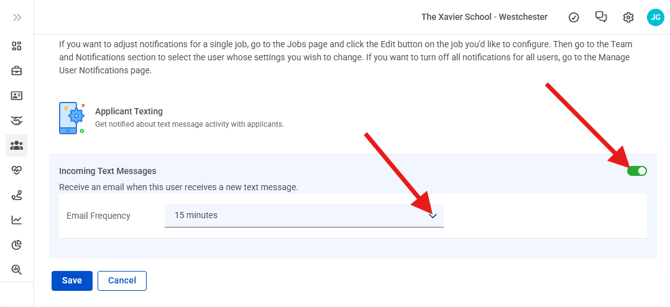
For text message notifications, ensure you enter the phone number at which you want to receive alerts.
To apply the changes you're making to existing jobs, click the **Apply these settings to existing jobs** checkbox. Otherwise, these changes will apply to new jobs only.

When you're done making changes, click the **Save** button at the bottom of the Edit Settings drawer.

If the user is still getting emails that they shouldn't or not getting emails that they should, it's a good idea to identify the email they are or aren't getting, as it is likely linked to a particular job. Follow the next set of steps to adjust notification settings for a user in relation to a particular job.
### Ensure a user gets notifications about people who apply to a specific job
This option can help if you have a user you want to get emails about applicants to a job to which they don't have access.
On your Jobs page, find the job for which you would like to change email notification settings.
Click the **Edit** button to edit the job.

Click the **Hiring Settings** section.

Scroll to the Team and Notifications section. Click the **Configure Notifications** button.
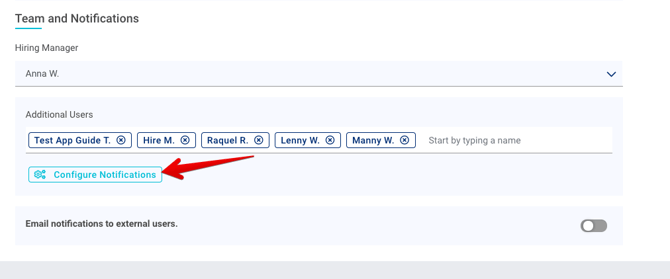
Click the **down arrow icon** to expand the notification options. Toggle on/off any notifications you want users to receive/not receive.

Click **Apply** and then **Update Job Post** to apply these settings
### Ensure someone who doesn't have access to your CareerPlug account gets a daily email about new applicants
On your Jobs page, locate the job for which you would like to change email notification settings and click the **Edit** button to edit it.

Click the **Hiring Settings** section.

Scroll to the Team and Notifications section. Turn on the **Email notifications to external users** toggle.

Enter the email addresses of people without access to CareerPlug who should receive an applicant summary for this job. Click **Update Job Post**.
- [Getting Started](https://adpsupport.careerplug.com/getting-started?hsLang=en#main-content)
- [CareerPlug 101](https://adpsupport.careerplug.com/getting-started?hsLang=en#careerplug-101)
- [How To Hire](https://adpsupport.careerplug.com/getting-started?hsLang=en#how-to-hire)
- [Account Set Up](https://adpsupport.careerplug.com/account-set-up?hsLang=en#main-content)
- [About Your Account](https://adpsupport.careerplug.com/account-set-up?hsLang=en#about-your-account)
- [Billing](https://adpsupport.careerplug.com/account-set-up?hsLang=en#billing)
- [Configuring Your Account](https://adpsupport.careerplug.com/account-set-up?hsLang=en#configuring-your-account)
- [Locations](https://adpsupport.careerplug.com/account-set-up?hsLang=en#locations)
- [Your Careers Page](https://adpsupport.careerplug.com/account-set-up?hsLang=en#your-careers-page)
- [Notifications](https://adpsupport.careerplug.com/account-set-up?hsLang=en#notifications)
- [User Access](https://adpsupport.careerplug.com/account-set-up?hsLang=en#user-access)
- [Admin](https://adpsupport.careerplug.com/account-set-up?hsLang=en#admin)
- [Support](https://adpsupport.careerplug.com/support?hsLang=en#main-content)
- [Contacting Support](https://adpsupport.careerplug.com/support?hsLang=en#contacting-support)
- [Troubleshooting](https://adpsupport.careerplug.com/support?hsLang=en#troubleshooting)
- [Live Trainings](https://adpsupport.careerplug.com/support?hsLang=en#live-trainings)
- [Job Postings](https://adpsupport.careerplug.com/job-postings?hsLang=en#main-content)
- [About Your Jobs](https://adpsupport.careerplug.com/job-postings?hsLang=en#about-your-jobs)
- [Creating & Editing Job Postings](https://adpsupport.careerplug.com/job-postings?hsLang=en#creating-editing-job-postings)
- [Sponsoring Jobs](https://adpsupport.careerplug.com/job-postings?hsLang=en#sponsoring-jobs)
- [Passive Recruiting](https://adpsupport.careerplug.com/job-postings?hsLang=en#passive-recruiting)
- [Managing Your Jobs](https://adpsupport.careerplug.com/job-postings?hsLang=en#managing-your-jobs)
- [Sharing Your Jobs](https://adpsupport.careerplug.com/job-postings?hsLang=en#sharing-your-jobs)
- [Job Boards](https://adpsupport.careerplug.com/job-postings?hsLang=en#job-boards)
- [Applicant Flow](https://adpsupport.careerplug.com/job-postings?hsLang=en#applicant-flow)
- [Applicant Tracking](https://adpsupport.careerplug.com/applicant-tracking?hsLang=en#main-content)
- [Applicant Information](https://adpsupport.careerplug.com/applicant-tracking?hsLang=en#applicant-information)
- [Managing Applicants](https://adpsupport.careerplug.com/applicant-tracking?hsLang=en#managing-applicants)
- [Sorting & Filtering Applicants](https://adpsupport.careerplug.com/applicant-tracking?hsLang=en#sorting-filtering-applicants)
- [Contacting Applicants](https://adpsupport.careerplug.com/applicant-tracking?hsLang=en#contacting-applicants)
- [Interviewing Applicants](https://adpsupport.careerplug.com/applicant-tracking?hsLang=en#interviewing-applicants)
- [Applicant Activity](https://adpsupport.careerplug.com/applicant-tracking?hsLang=en#applicant-activity)
- [Hiring](https://adpsupport.careerplug.com/applicant-tracking?hsLang=en#hiring)
- [Applicant Experience](https://adpsupport.careerplug.com/applicant-tracking?hsLang=en#applicant-experience)
- [Hiring Tools & Automations](https://adpsupport.careerplug.com/hiring-tools-automations?hsLang=en#main-content)
- [Autopilot](https://adpsupport.careerplug.com/hiring-tools-automations?hsLang=en#autopilot)
- [Hiring Process](https://adpsupport.careerplug.com/hiring-tools-automations?hsLang=en#hiring-process)
- [Automations](https://adpsupport.careerplug.com/hiring-tools-automations?hsLang=en#automations)
- [Prescreen Questions](https://adpsupport.careerplug.com/hiring-tools-automations?hsLang=en#prescreen-questions)
- [Assessments](https://adpsupport.careerplug.com/hiring-tools-automations?hsLang=en#assessments)
- [Email & Text Messages](https://adpsupport.careerplug.com/hiring-tools-automations?hsLang=en#email-text-messages)
- [Scorecards](https://adpsupport.careerplug.com/hiring-tools-automations?hsLang=en#scorecards)
- [Offer Letters](https://adpsupport.careerplug.com/hiring-tools-automations?hsLang=en#offer-letters)
- [Templates](https://adpsupport.careerplug.com/hiring-tools-automations?hsLang=en#templates)
- [Integrations](https://adpsupport.careerplug.com/hiring-tools-automations?hsLang=en#integrations)
- [Other Tools](https://adpsupport.careerplug.com/hiring-tools-automations?hsLang=en#other-tools)
- [Reporting & Compliance](https://adpsupport.careerplug.com/reporting-compliance?hsLang=en#main-content)
- [Reporting](https://adpsupport.careerplug.com/reporting-compliance?hsLang=en#reporting)
- [Charts](https://adpsupport.careerplug.com/reporting-compliance?hsLang=en#charts)
- [Compliance](https://adpsupport.careerplug.com/reporting-compliance?hsLang=en#compliance)
- [FAQs & Integrations](https://adpsupport.careerplug.com/faqs-integrations?hsLang=en#main-content)
- [The CareerPlug + ADP Partnership](https://adpsupport.careerplug.com/faqs-integrations?hsLang=en#the-careerplug-adp-partnership)
- [Integrations](https://adpsupport.careerplug.com/faqs-integrations?hsLang=en#integrations)
- [What's New](https://adpsupport.careerplug.com/whats-new?hsLang=en#main-content)
- [Monthly Updates](https://adpsupport.careerplug.com/whats-new?hsLang=en#monthly-updates)
- [Account Changes](https://adpsupport.careerplug.com/whats-new?hsLang=en#account-changes)
[](https://adpsupport.careerplug.com?hsLang=en)
Handcrafted in Austin, Texas
© 2026 CareerPlug. All rights reserved.