---
title: Sending assessments automatically to Fast Track applicants
description: With CareerPlug, you can enable an option to automatically send assessments to new Fast Track applicants.
---
[Skip to content](https://adpsupport.careerplug.com/sending-assessments-automatically-to-fast-track-applicants#main-content)
[Submit a Request](https://adpsupport.careerplug.com/kb-tickets/new?hsLang=en)
[![CP ADP Logo 2025.png\]](https://adpsupport.careerplug.com/hs-fs/hubfs/CP%20ADP%20Logo%202025.png?width=297&height=40&name=CP%20ADP%20Logo%202025.png)](https://adpsupport.careerplug.com?hsLang=en)
Open main navigation
Close main navigation
- [Submit a Request](https://adpsupport.careerplug.com/kb-tickets/new)
- [Get help now!](https://adpsupport.careerplug.com/help)
[Get help now!](https://adpsupport.careerplug.com/help?hsLang=en)
How can we help?
- There are no suggestions because the search field is empty.
1. [ADP Help Center](https://adpsupport.careerplug.com/?hsLang=en)
2. [Hiring Tools & Automations](https://adpsupport.careerplug.com/hiring-tools-automations?hsLang=en)
3. [Assessments](https://adpsupport.careerplug.com/hiring-tools-automations?hsLang=en#assessments)
# Sending assessments automatically to Fast Track applicants
Available with a CareerPlug [Hire](https://adpsupport.careerplug.com/benefits-of-your-careerplug-pro-subscription?hsLang=en) or [Grow](https://adpsupport.careerplug.com/benefits-of-a-careerplug-premium-subscription?hsLang=en) subscription.
Our best recommendation is to act quickly with [Fast Track applicants](https://adpsupport.careerplug.com/fast-track?hsLang=en). Fast Track applicants are often highly sought after by other hiring companies and may be quickly hired elsewhere. Our most successful clients often contact their top applicants immediately after receiving their applications to give themselves the best chance to make a great hire.
One way you can let a Fast Track applicant know that you are interested in pursuing them is by immediately sending them an assessment. With CareerPlug, you can enable an option to automatically send assessments to new Fast Track applicants. You'll enable this setting on your Company Profile page.
### Turning on Automatic Fast Track Assessments
1\. Navigate to **Settings (gear icon) \> My organization \> Company Profile**.
%20Pointed%20to%20company%20profile.png?width=670&height=261&name=Settings%2c%20My%20Org%2c%20Company%20Profile%20(Nav%20bar%20minimized)%20Pointed%20to%20company%20profile.png)
2\. Scroll to the bottom of the page and select the **Enable Automatic Fast Track Assessments** checkbox.
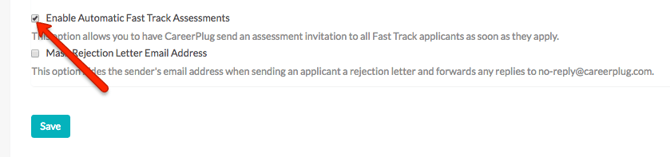
3\. Click **Save**.
Now, when an applicant answers a Fast Track prescreen question with the desired response(s), they will be considered a Fast Track applicant. CareerPlug will automatically email them an invitation with a link to take any assessments assigned to the job for which they applied.
To make sure the right assessments are assigned to a job, navigate to your **Jobs** page to [edit an existing job posting](https://support.careerplug.com/posting-a-job?hsLang=en#edit) (or [edit your job template and apply changes to all jobs](https://support.careerplug.com/job-templates?hsLang=en#multiplejobs)). You can also review your default assessment invitation email to make sure you send the right message to applicants.
With Automatic Fast Track Assessments turned on, applicants who answer Fast Track prescreen questions with the desired response(s) will automatically receive an assessment invitation immediately, regardless of [where the Assessment hiring step falls in your hiring process](https://adpsupport.careerplug.com/creating-or-editing-a-hiring-process?hsLang=en).
### Turning off Automatic Fast Track Assessments
1\. Navigate to **Settings \> My Organization \> Company Profile**.
%20Pointed%20to%20company%20profile.png?width=670&height=261&name=Settings%2c%20My%20Org%2c%20Company%20Profile%20(Nav%20bar%20minimized)%20Pointed%20to%20company%20profile.png)
2\. Scroll to the bottom of the Company Profile page.
3\. Uncheck the **Enable Automatic Fast Track Assessments** checkbox.
4\. Click the **Save** button to update your account.
%20(Bottom)%20Enable%20Fast%20Track.png?width=670&height=225&name=Settings%2c%20My%20Organization%2c%20Company%20Profile%20(Nav%20bar%20minimized)%20(Bottom)%20Enable%20Fast%20Track.png)
- [Getting Started](https://adpsupport.careerplug.com/getting-started?hsLang=en#main-content)
- [CareerPlug 101](https://adpsupport.careerplug.com/getting-started?hsLang=en#careerplug-101)
- [How To Hire](https://adpsupport.careerplug.com/getting-started?hsLang=en#how-to-hire)
- [Account Set Up](https://adpsupport.careerplug.com/account-set-up?hsLang=en#main-content)
- [About Your Account](https://adpsupport.careerplug.com/account-set-up?hsLang=en#about-your-account)
- [Billing](https://adpsupport.careerplug.com/account-set-up?hsLang=en#billing)
- [Configuring Your Account](https://adpsupport.careerplug.com/account-set-up?hsLang=en#configuring-your-account)
- [Locations](https://adpsupport.careerplug.com/account-set-up?hsLang=en#locations)
- [Your Careers Page](https://adpsupport.careerplug.com/account-set-up?hsLang=en#your-careers-page)
- [Notifications](https://adpsupport.careerplug.com/account-set-up?hsLang=en#notifications)
- [User Access](https://adpsupport.careerplug.com/account-set-up?hsLang=en#user-access)
- [Admin](https://adpsupport.careerplug.com/account-set-up?hsLang=en#admin)
- [Support](https://adpsupport.careerplug.com/support?hsLang=en#main-content)
- [Contacting Support](https://adpsupport.careerplug.com/support?hsLang=en#contacting-support)
- [Troubleshooting](https://adpsupport.careerplug.com/support?hsLang=en#troubleshooting)
- [Live Trainings](https://adpsupport.careerplug.com/support?hsLang=en#live-trainings)
- [Job Postings](https://adpsupport.careerplug.com/job-postings?hsLang=en#main-content)
- [About Your Jobs](https://adpsupport.careerplug.com/job-postings?hsLang=en#about-your-jobs)
- [Creating & Editing Job Postings](https://adpsupport.careerplug.com/job-postings?hsLang=en#creating-editing-job-postings)
- [Sponsoring Jobs](https://adpsupport.careerplug.com/job-postings?hsLang=en#sponsoring-jobs)
- [Passive Recruiting](https://adpsupport.careerplug.com/job-postings?hsLang=en#passive-recruiting)
- [Managing Your Jobs](https://adpsupport.careerplug.com/job-postings?hsLang=en#managing-your-jobs)
- [Sharing Your Jobs](https://adpsupport.careerplug.com/job-postings?hsLang=en#sharing-your-jobs)
- [Job Boards](https://adpsupport.careerplug.com/job-postings?hsLang=en#job-boards)
- [Applicant Flow](https://adpsupport.careerplug.com/job-postings?hsLang=en#applicant-flow)
- [Applicant Tracking](https://adpsupport.careerplug.com/applicant-tracking?hsLang=en#main-content)
- [Applicant Information](https://adpsupport.careerplug.com/applicant-tracking?hsLang=en#applicant-information)
- [Managing Applicants](https://adpsupport.careerplug.com/applicant-tracking?hsLang=en#managing-applicants)
- [Sorting & Filtering Applicants](https://adpsupport.careerplug.com/applicant-tracking?hsLang=en#sorting-filtering-applicants)
- [Contacting Applicants](https://adpsupport.careerplug.com/applicant-tracking?hsLang=en#contacting-applicants)
- [Interviewing Applicants](https://adpsupport.careerplug.com/applicant-tracking?hsLang=en#interviewing-applicants)
- [Applicant Activity](https://adpsupport.careerplug.com/applicant-tracking?hsLang=en#applicant-activity)
- [Hiring](https://adpsupport.careerplug.com/applicant-tracking?hsLang=en#hiring)
- [Applicant Experience](https://adpsupport.careerplug.com/applicant-tracking?hsLang=en#applicant-experience)
- [Hiring Tools & Automations](https://adpsupport.careerplug.com/hiring-tools-automations?hsLang=en#main-content)
- [Autopilot](https://adpsupport.careerplug.com/hiring-tools-automations?hsLang=en#autopilot)
- [Hiring Process](https://adpsupport.careerplug.com/hiring-tools-automations?hsLang=en#hiring-process)
- [Automations](https://adpsupport.careerplug.com/hiring-tools-automations?hsLang=en#automations)
- [Prescreen Questions](https://adpsupport.careerplug.com/hiring-tools-automations?hsLang=en#prescreen-questions)
- [Assessments](https://adpsupport.careerplug.com/hiring-tools-automations?hsLang=en#assessments)
- [Email & Text Messages](https://adpsupport.careerplug.com/hiring-tools-automations?hsLang=en#email-text-messages)
- [Scorecards](https://adpsupport.careerplug.com/hiring-tools-automations?hsLang=en#scorecards)
- [Offer Letters](https://adpsupport.careerplug.com/hiring-tools-automations?hsLang=en#offer-letters)
- [Templates](https://adpsupport.careerplug.com/hiring-tools-automations?hsLang=en#templates)
- [Integrations](https://adpsupport.careerplug.com/hiring-tools-automations?hsLang=en#integrations)
- [Other Tools](https://adpsupport.careerplug.com/hiring-tools-automations?hsLang=en#other-tools)
- [Reporting & Compliance](https://adpsupport.careerplug.com/reporting-compliance?hsLang=en#main-content)
- [Reporting](https://adpsupport.careerplug.com/reporting-compliance?hsLang=en#reporting)
- [Charts](https://adpsupport.careerplug.com/reporting-compliance?hsLang=en#charts)
- [Compliance](https://adpsupport.careerplug.com/reporting-compliance?hsLang=en#compliance)
- [FAQs & Integrations](https://adpsupport.careerplug.com/faqs-integrations?hsLang=en#main-content)
- [The CareerPlug + ADP Partnership](https://adpsupport.careerplug.com/faqs-integrations?hsLang=en#the-careerplug-adp-partnership)
- [Integrations](https://adpsupport.careerplug.com/faqs-integrations?hsLang=en#integrations)
- [What's New](https://adpsupport.careerplug.com/whats-new?hsLang=en#main-content)
- [Monthly Updates](https://adpsupport.careerplug.com/whats-new?hsLang=en#monthly-updates)
- [Account Changes](https://adpsupport.careerplug.com/whats-new?hsLang=en#account-changes)
[](https://adpsupport.careerplug.com?hsLang=en)
Handcrafted in Austin, Texas
© 2026 CareerPlug. All rights reserved.