---
title: Using assessments
description: Learn how to use assessments included with your CareerPlug account to evaluate whether applicants possess the necessary skills and personality traits to perform a job effectively.
---
[Skip to content](https://adpsupport.careerplug.com/using-assessments#main-content)
[Submit a Request](https://adpsupport.careerplug.com/kb-tickets/new?hsLang=en)
[![CP ADP Logo 2025.png\]](https://adpsupport.careerplug.com/hs-fs/hubfs/CP%20ADP%20Logo%202025.png?width=297&height=40&name=CP%20ADP%20Logo%202025.png)](https://adpsupport.careerplug.com?hsLang=en)
Open main navigation
Close main navigation
- [Submit a Request](https://adpsupport.careerplug.com/kb-tickets/new)
- [Get help now!](https://adpsupport.careerplug.com/help)
[Get help now!](https://adpsupport.careerplug.com/help?hsLang=en)
How can we help?
- There are no suggestions because the search field is empty.
1. [ADP Help Center](https://adpsupport.careerplug.com/?hsLang=en)
2. [Hiring Tools & Automations](https://adpsupport.careerplug.com/hiring-tools-automations?hsLang=en)
3. [Assessments](https://adpsupport.careerplug.com/hiring-tools-automations?hsLang=en#assessments)
# Using assessments
Available with a CareerPlug [Hire](https://adpsupport.careerplug.com/benefits-of-your-careerplug-pro-subscription?hsLang=en) or [Grow](https://adpsupport.careerplug.com/benefits-of-a-careerplug-premium-subscription?hsLang=en) subscription.
Your CareerPlug account includes a timed math/verbal assessment and a [configurable personality assessment](https://adpsupport.careerplug.com/careerplug-s-personality-assessment?hsLang=en) to help you evaluate whether applicants possess the necessary skills and personality traits to perform a job effectively.
#### In this article:
- [Adding assessments to jobs](https://adpsupport.careerplug.com/using-assessments#adding)
- [Removing assessments from jobs](https://adpsupport.careerplug.com/using-assessments#removing)
- [Sending assessments](https://adpsupport.careerplug.com/using-assessments#sending)
- [Viewing an applicant's assessment score](https://adpsupport.careerplug.com/using-assessments#viewing)
### Adding assessments to jobs
You will have to decide whether to use assessments in your hiring process when you post your first job. If you want applicants to complete either or both of the available assessments, you need to ensure that you assign them to your jobs when you are creating (or editing) a job posting.
#### To add an assessment to one of your jobs:
1\. Navigate to the **Applicant Evaluation** tab of your job posting.
2\. Click the toggle for either assessment you wish to add.
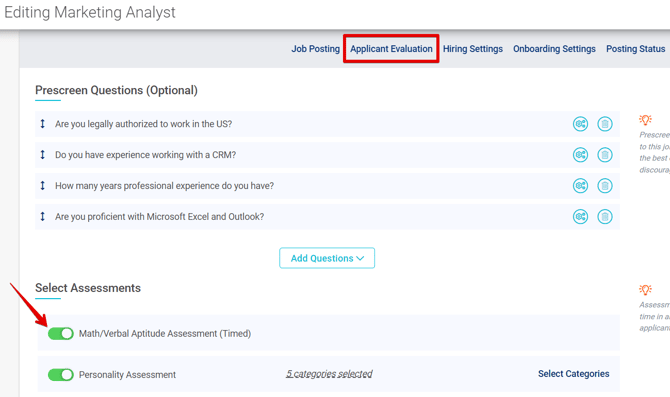
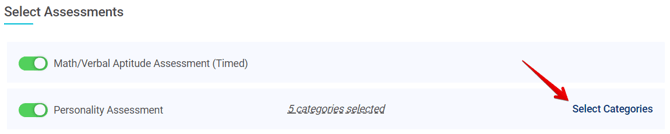
3\. Click **Select Categories** to [configure the personality assessment to focus on up to 16 specific personality traits.](https://adpsupport.careerplug.com/careerplug-s-personality-assessment?hsLang=en)
4\. Choose any personality traits you would like to test your candidates on by clicking the associated checkbox.
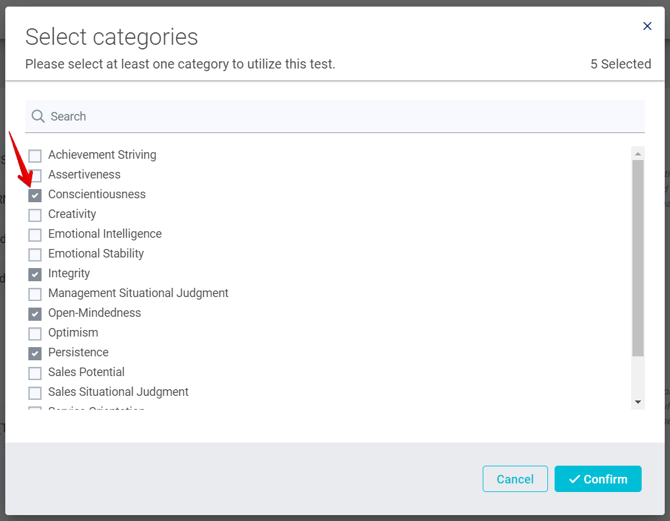
Keep in mind that the more traits you select, the lengthier the assessment will be for applicants.
5\. Click **Confirm** when you're done selecting traits.
6\. Click **Update Job Post** to save changes to your job.
### Removing assessments from jobs
#### To remove an assessment from one of your jobs:
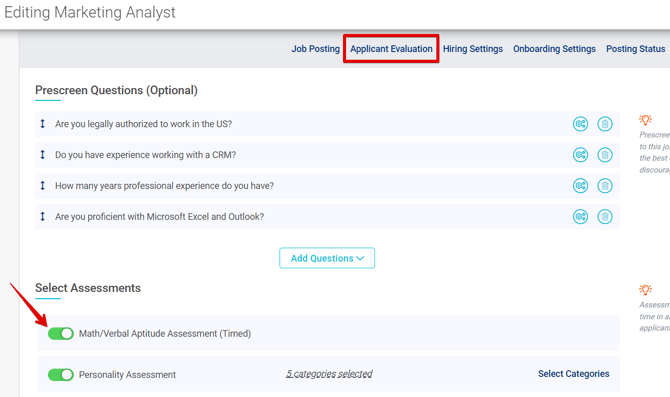
1\. Navigate to the **Applicant Evaluation** tab of your job posting.
2\. Toggle off the slider(s) for either assessment you wish to remove from your job.
### Sending assessments
Once an applicant reaches the Assessment stage of your hiring process, you will have the ability to invite them to complete any assessments associated with that job.
To avoid any potential bias or discrimination against applicants during the hiring process, [EEOC guidelines advise that pre-employment tests or assessments must be necessary and related to the job as well as non-discriminatory](https://www.eeoc.gov/prohibited-employment-policiespractices). In other words, if you are sending a job-related assessment to one applicant, you should send that same assessment to all applicants for that position.
#### To send an assessment to one of your applicants:
1\. Navigate to your **Applicants** page.
%20(NavEXP)%20(Standard)%20(Cropped%2c%20pointed%20to%20applicants).png?width=670&height=199&name=Dashboard%20(6.9.26)%20(NavEXP)%20(Standard)%20(Cropped%2c%20pointed%20to%20applicants).png)
2\. Find the applicant to whom you want to send an assessment and click their name to open the applicant's profile.
%20(Nav%20bar%20minimized)%20Pointed%20to%20applicant%20profile.png?width=670&height=366&name=Applicants%20page%20(6.23.26)%20(Nav%20bar%20minimized)%20Pointed%20to%20applicant%20profile.png)
3\. On the **Overview** tab of the applicant's profile, click the **Invite** button within the Assessment step. You can also click the **Invite** button in the upper right corner of the page.
.png?width=670&height=349&name=Ororo%20Munroe%20applicant%20page%2c%20showing%20assessment%20(Nav%20bar%20collasped).png)
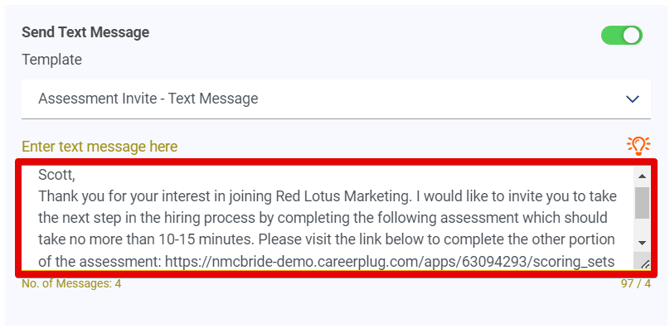
4\. As long as you have [text messaging](https://adpsupport.careerplug.com/using-text-messaging?hsLang=en) enabled for your account, you'll first select the [text message template](https://adpsupport.careerplug.com/using-text-message-templates?hsLang=en) you want to use from the **Template** drop-down.

If you only have one template for the Assessment hiring step, it will be selected by default. If you don't have any templates set up, you can easily [create a text message template](https://adpsupport.careerplug.com/using-text-message-templates?hsLang=en#creating) and add it to one of your existing hiring processes.
If you don't want to send a text message assessment invitation, you can always turn off the **Send Text Message** toggle.

5\. Review and revise your text message before sending to ensure it's formatted as you'd prefer.
6\. Select the email template you want to use from the **Template** drop-down.
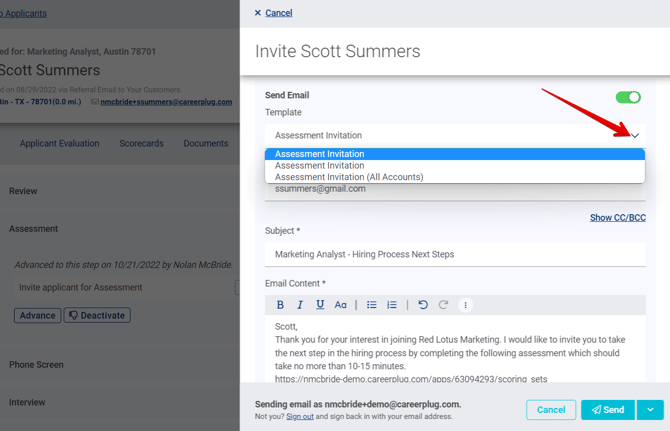
By default, a pre-written email template is provided for this step, but you also have the option to select [any custom email templates you have created](https://adpsupport.careerplug.com/editing-email-templates?hsLang=en).
7\. Edit the **Subject** and **Email Content**.

8\. When you're finished editing and configuring your email, click the **Send** button.
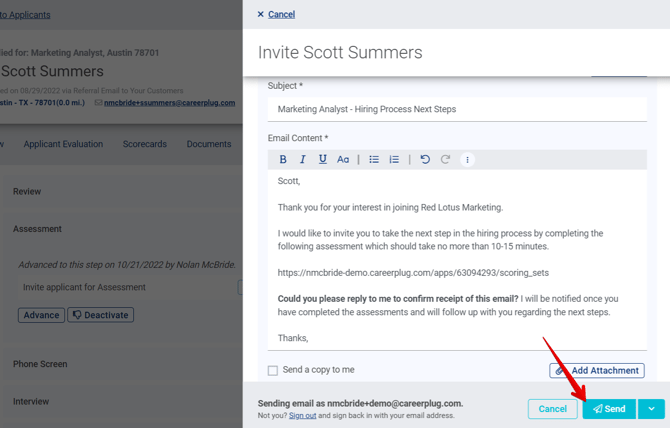
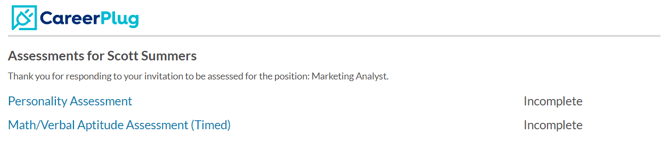
9\. The applicant will receive an email with a link to complete the assessment(s).
As long as your applicant is in the Assessment step of your hiring process, you can also click the **Send Invitation** button in the Actions column on your Applicants page.
%20(Nav%20bar%20minimized)%20Send%20assessments.png?width=670&height=366&name=Applicants%20page%20(6.23.26)%20(Nav%20bar%20minimized)%20Send%20assessments.png)
### Viewing an applicant's assessment score
When an applicant has completed all assigned assessments, you will receive an email notifying you and allowing you to view their score(s).
#### To view an applicant's assessments score(s):
1\. Navigate to your **Applicants** page.
%20(NavEXP)%20(Standard)%20(Cropped%2c%20pointed%20to%20applicants).png?width=670&height=199&name=Dashboard%20(6.9.26)%20(NavEXP)%20(Standard)%20(Cropped%2c%20pointed%20to%20applicants).png)
2\. Click the **View Assessments** button in the Actions column of the associated employee.
%20Pointed%20to%20view%20assessments.png?width=670&height=268&name=Applicants%20page%20(Nav%20bar%20collasped)%20Pointed%20to%20view%20assessments.png)
3\. Click the **View** button next to the assessment you wish to review.

If they have finished one, but not all, of the assigned assessments, you can still view the results, but you'll need to navigate to the Applicant Evaluation tab of the applicant's profile yourself by clicking their name from your Applicant page.
This will open their assessment report, which includes the applicant's overall assessment score, their score by category, [any benchmarked employees' scores](https://adpsupport.careerplug.com/setting-benchmarks-for-assessments?hsLang=en), and a chart of the applicant's strengths (personality assessment only). You can find an overview of the assessment scoring and categories below the applicant's scores.
These scores should **not** be interpreted as if they were traditional school test scores. In many instances, a score of 50 or 60 may be acceptable for a position, even though those same scores would indicate a failing grade by traditional school standards. We recommend that you rely on the scores of employees who perform comparable job functions to the position for which the applicant has applied. We also recommend that the [hiring manager take the assessments themselves](https://adpsupport.careerplug.com/test-careerplug-s-assessments-by-taking-them-yourself?hsLang=en) so that they have a better understanding of [how to evaluate applicants' assessment scores](https://adpsupport.careerplug.com/viewing-and-evaluating-an-applicant-s-assessment-score?hsLang=en).
- [Getting Started](https://adpsupport.careerplug.com/getting-started?hsLang=en#main-content)
- [CareerPlug 101](https://adpsupport.careerplug.com/getting-started?hsLang=en#careerplug-101)
- [How To Hire](https://adpsupport.careerplug.com/getting-started?hsLang=en#how-to-hire)
- [Account Set Up](https://adpsupport.careerplug.com/account-set-up?hsLang=en#main-content)
- [About Your Account](https://adpsupport.careerplug.com/account-set-up?hsLang=en#about-your-account)
- [Billing](https://adpsupport.careerplug.com/account-set-up?hsLang=en#billing)
- [Configuring Your Account](https://adpsupport.careerplug.com/account-set-up?hsLang=en#configuring-your-account)
- [Locations](https://adpsupport.careerplug.com/account-set-up?hsLang=en#locations)
- [Your Careers Page](https://adpsupport.careerplug.com/account-set-up?hsLang=en#your-careers-page)
- [Notifications](https://adpsupport.careerplug.com/account-set-up?hsLang=en#notifications)
- [User Access](https://adpsupport.careerplug.com/account-set-up?hsLang=en#user-access)
- [Admin](https://adpsupport.careerplug.com/account-set-up?hsLang=en#admin)
- [Support](https://adpsupport.careerplug.com/support?hsLang=en#main-content)
- [Contacting Support](https://adpsupport.careerplug.com/support?hsLang=en#contacting-support)
- [Troubleshooting](https://adpsupport.careerplug.com/support?hsLang=en#troubleshooting)
- [Live Trainings](https://adpsupport.careerplug.com/support?hsLang=en#live-trainings)
- [Job Postings](https://adpsupport.careerplug.com/job-postings?hsLang=en#main-content)
- [About Your Jobs](https://adpsupport.careerplug.com/job-postings?hsLang=en#about-your-jobs)
- [Creating & Editing Job Postings](https://adpsupport.careerplug.com/job-postings?hsLang=en#creating-editing-job-postings)
- [Sponsoring Jobs](https://adpsupport.careerplug.com/job-postings?hsLang=en#sponsoring-jobs)
- [Passive Recruiting](https://adpsupport.careerplug.com/job-postings?hsLang=en#passive-recruiting)
- [Managing Your Jobs](https://adpsupport.careerplug.com/job-postings?hsLang=en#managing-your-jobs)
- [Sharing Your Jobs](https://adpsupport.careerplug.com/job-postings?hsLang=en#sharing-your-jobs)
- [Job Boards](https://adpsupport.careerplug.com/job-postings?hsLang=en#job-boards)
- [Applicant Flow](https://adpsupport.careerplug.com/job-postings?hsLang=en#applicant-flow)
- [Applicant Tracking](https://adpsupport.careerplug.com/applicant-tracking?hsLang=en#main-content)
- [Applicant Information](https://adpsupport.careerplug.com/applicant-tracking?hsLang=en#applicant-information)
- [Managing Applicants](https://adpsupport.careerplug.com/applicant-tracking?hsLang=en#managing-applicants)
- [Sorting & Filtering Applicants](https://adpsupport.careerplug.com/applicant-tracking?hsLang=en#sorting-filtering-applicants)
- [Contacting Applicants](https://adpsupport.careerplug.com/applicant-tracking?hsLang=en#contacting-applicants)
- [Interviewing Applicants](https://adpsupport.careerplug.com/applicant-tracking?hsLang=en#interviewing-applicants)
- [Applicant Activity](https://adpsupport.careerplug.com/applicant-tracking?hsLang=en#applicant-activity)
- [Hiring](https://adpsupport.careerplug.com/applicant-tracking?hsLang=en#hiring)
- [Applicant Experience](https://adpsupport.careerplug.com/applicant-tracking?hsLang=en#applicant-experience)
- [Hiring Tools & Automations](https://adpsupport.careerplug.com/hiring-tools-automations?hsLang=en#main-content)
- [Autopilot](https://adpsupport.careerplug.com/hiring-tools-automations?hsLang=en#autopilot)
- [Hiring Process](https://adpsupport.careerplug.com/hiring-tools-automations?hsLang=en#hiring-process)
- [Automations](https://adpsupport.careerplug.com/hiring-tools-automations?hsLang=en#automations)
- [Prescreen Questions](https://adpsupport.careerplug.com/hiring-tools-automations?hsLang=en#prescreen-questions)
- [Assessments](https://adpsupport.careerplug.com/hiring-tools-automations?hsLang=en#assessments)
- [Email & Text Messages](https://adpsupport.careerplug.com/hiring-tools-automations?hsLang=en#email-text-messages)
- [Scorecards](https://adpsupport.careerplug.com/hiring-tools-automations?hsLang=en#scorecards)
- [Offer Letters](https://adpsupport.careerplug.com/hiring-tools-automations?hsLang=en#offer-letters)
- [Templates](https://adpsupport.careerplug.com/hiring-tools-automations?hsLang=en#templates)
- [Integrations](https://adpsupport.careerplug.com/hiring-tools-automations?hsLang=en#integrations)
- [Other Tools](https://adpsupport.careerplug.com/hiring-tools-automations?hsLang=en#other-tools)
- [Reporting & Compliance](https://adpsupport.careerplug.com/reporting-compliance?hsLang=en#main-content)
- [Reporting](https://adpsupport.careerplug.com/reporting-compliance?hsLang=en#reporting)
- [Charts](https://adpsupport.careerplug.com/reporting-compliance?hsLang=en#charts)
- [Compliance](https://adpsupport.careerplug.com/reporting-compliance?hsLang=en#compliance)
- [FAQs & Integrations](https://adpsupport.careerplug.com/faqs-integrations?hsLang=en#main-content)
- [The CareerPlug + ADP Partnership](https://adpsupport.careerplug.com/faqs-integrations?hsLang=en#the-careerplug-adp-partnership)
- [Integrations](https://adpsupport.careerplug.com/faqs-integrations?hsLang=en#integrations)
- [What's New](https://adpsupport.careerplug.com/whats-new?hsLang=en#main-content)
- [Monthly Updates](https://adpsupport.careerplug.com/whats-new?hsLang=en#monthly-updates)
- [Account Changes](https://adpsupport.careerplug.com/whats-new?hsLang=en#account-changes)
[](https://adpsupport.careerplug.com?hsLang=en)
Handcrafted in Austin, Texas
© 2026 CareerPlug. All rights reserved.