![CP ADP Logo 2025.png]](https://adpsupport.careerplug.com/hs-fs/hubfs/CP%20ADP%20Logo%202025.png?width=297&height=40&name=CP%20ADP%20Logo%202025.png)
Facebook Groups are an easy, free way to advertise your job postings to a local audience, connect with your community, and cultivate brand awareness. Many towns, big and small, have Facebook groups that serve as local job boards, often with thousands of members actively involved. Connecting with the community in this way can show you’re serious about hiring locally and that you value your community.
Facebook Groups can also provide high-quality applicants who are both invested in your business and the community where you work. They’re also a great way to reach passive job seekers who may not know they’re interested in a new position until they see your post.
How do I find the right Facebook Groups to share jobs to?
Don’t have a Facebook business account? You can set one up for free. It’s important that you share jobs from your business account, as the account name will appear when you join a group and post in it.
1. From your Facebook business account, click Groups on the left side of your screen.
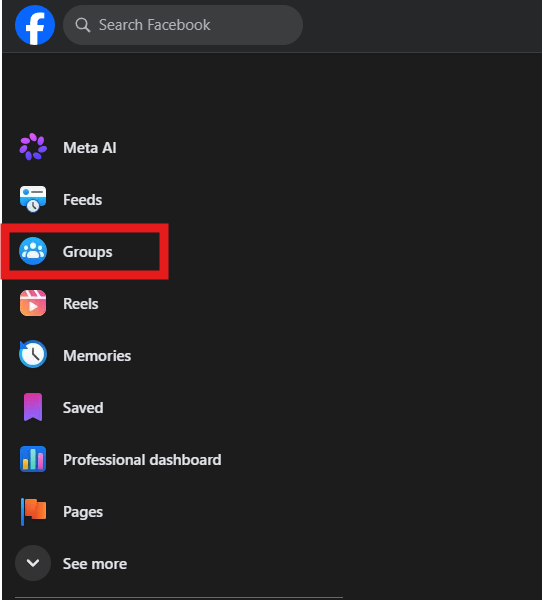
2. Click Search in the top-left corner of the page and enter search terms relevant to your business.
Examples of search terms you can use include:
- “[My city] Jobs”
- “Jobs in [my city]”
- “[Industry] jobs”
- “[Industry] groups”
- “Community groups near me”
- “Community groups in [my city]”
If you are primarily hiring remotely, consider search terms like “Remote jobs” or “[Industry] remote jobs.”

Before joining any of these groups, read the rules thoroughly. Some groups restrict businesses from posting at all; others limit the frequency of company postings; and still others require specific rules or formatting.
It’s very important that you follow each group’s rules as closely as possible to ensure your post gets as much visibility as possible. Businesses that break the rules in Facebook Groups are often removed without warning or consideration.
Note: Some groups allow you to join and post immediately — some may have a waiting period for a moderator to review your answers. Other groups may require you to answer a series of questions about your intent. Answering these questions honestly and quickly will help you gain access to the group faster.
3. Join at least 5 different groups to test performance and reach the largest audience.
4. In your CareerPlug account, create a custom source for any Facebook Groups you join. Alternatively, you can create a single custom source that tracks applicants across all your Facebook Groups.
A custom source allows you to track any candidates who find and apply to your job using a unique tracking link. Custom sources can also help you identify which groups are working for you and which aren’t. You can then use this information to fine-tune where to share your jobs going forward, what language works best with which groups, and more.
%20(gif)%20(fixed).gif?width=670&height=259&name=Custom%20Sources%20(Adding%20a%20custom%20source)%20(gif)%20(fixed).gif)
Note: There is no limit to the number of custom sources you can create and use.
5. Copy the link to your custom source for the job posting you want to share in a Facebook Group.
From your Jobs page, click the three-dots icon to the right of a job and select Share from the drop-down menu. In the Share Job pop-up window, click the Track Custom Sources tile. In the Custom Sources drawer, click the Copy button to the right of the source where you want to share your job and select Copy link from the drop-down menu.
%20(Copy%20link%20highlights).png?width=450&height=395&name=Custom%20Sources%20drawer%20(custom%20source%20drop%20down)%20(Copy%20link%20highlights).png)
6. From your Facebook business account, create a post in each Facebook Group you’ve joined that includes your custom source tracking link and a few key details about the job itself.
Be brief, honest, and personal. Think short, sweet, and to the point. Remember that Facebook isn’t LinkedIn, and you don’t have to be stuffy or overly professional. Your goal is to meaningfully connect with your industry or community.
7. Track the effectiveness of your Facebook Groups posts using your source analysis chart in CareerPlug.
This report can help you understand which sources generate the most applicants and, of those applicants, which ones convert into hires.
%20Insights%2c%20Source%20Analysis%20Highlighted.png?width=670&height=293&name=Hiring%20Insights%2c%20Source%20Analysis%20Chart%20(Nav%20Bar%20Minimized)%20Insights%2c%20Source%20Analysis%20Highlighted.png)
Frequently asked questions (FAQs)
Q: What if a group has a rule against posting jobs?
A: Be aware of the individual rules for each Facebook Group you join. A group’s rules are usually located on the About tab of the specific group’s page.

Rules in these groups exist for a reason, and trying to bypass them will likely just get you banned from the group itself. Before posting in any group, review its rules to keep them fresh in your mind.
Q: How do I write a post that gets people interested in my open position?
A: In addition to sharing the link from your custom source, include a short blurb about your job or company in the post.
Short, conversational posts tend to gain the most traction in Facebook groups. Keep your post punchy and to the point, but remember that you might be personally addressing your next hire! Most people scrolling through their social media feeds skip posts that are too long or too formal. You only have a moment to capture someone’s attention.
We also recommend avoiding the “hard sell” of your job posting when you can. Highlighting benefits and promoting yourself is one thing, but telling potential applicants this is “the best job in the world,” and everyone is “just like family,” isn’t a selling point; it’s a red flag. If you’re unsure where to draw the line, scroll through a few groups and search for the most successful job postings with the highest engagement. These can give you a starting point for the tone and style of your own posts.
Q: Can I use the same post in every group?
A: You can, but we don’t recommend it!
Not every group will respond the same way, so taking an extra step to tailor your post to individual groups or markets can make a big difference.
We recommend tailoring each post to the group you’re posting in and the job you’re sharing. This is an extra step that not all companies take, but it can go a long way to attracting quality applicants.
For example, if you’re posting in a local jobs group, be sure to emphasize that you are a community employer. If you’re sharing a caregiver role in a caregiver-centric job group, focus on support, culture, and teamwork.
Put thought and consideration into what people who use these groups value, and what someone considering this position would find attractive and important. If you can highlight that, you’re likely to see a lot more engagement.
More than just posting an open job, consider how you are presenting the position and your company to the community. Your post is an opportunity to connect with people who live and work in the community you serve, and who can easily become invested in your success. Building brand awareness is a good way to engage with your community.
Q: What do I do after creating my post?
A: Check on your posts at least twice a week while you are actively hiring and testing Facebook Groups. It’s likely that a group’s members will post questions and comments about the job and/or your company’s culture, with hopes to gain a better understanding of whether they might be a good fit before they apply.
Respond to any questions on your post promptly to show potential applicants that you care about their concerns, value their time, and are invested in your hiring process. Being responsive can also help job seekers quickly sense whether they might be a good fit, saving you the time and effort of finding out for them.
Q: I’m seeing less engagement than before. What can I do about it?
A: Facebook Groups can change over time, and you may not always receive a consistent volume or quality of applicants. This likely has nothing to do with what you’re doing specifically! Groups change, members leave, and the Facebook algorithm may shift away from a specific group.
If you are not seeing the engagement you’re used to, consider searching for new or different Facebook groups to post to. What might have been a small group six months ago could have gained thousands of followers since then and become a new, quality source of local applicants.
You can also adjust the copy of your posts in these groups to better reflect what job seekers are looking for right now. Experiment by highlighting different benefits of the role, or perks an employee may receive when working for your company, until you find something that lands.