---
title: Using text message templates
description: Create, edit, and use text message templates to interact with your applicants faster and streamline the hiring process.
---
[Skip to content](https://adpsupport.careerplug.com/using-text-message-templates#main-content)
[Submit a Request](https://adpsupport.careerplug.com/kb-tickets/new?hsLang=en)
[![CP ADP Logo 2025.png\]](https://adpsupport.careerplug.com/hs-fs/hubfs/CP%20ADP%20Logo%202025.png?width=297&height=40&name=CP%20ADP%20Logo%202025.png)](https://adpsupport.careerplug.com?hsLang=en)
Open main navigation
Close main navigation
- [Submit a Request](https://adpsupport.careerplug.com/kb-tickets/new)
- [Get help now!](https://adpsupport.careerplug.com/help)
[Get help now!](https://adpsupport.careerplug.com/help?hsLang=en)
How can we help?
- There are no suggestions because the search field is empty.
1. [ADP Help Center](https://adpsupport.careerplug.com/?hsLang=en)
2. [Hiring Tools & Automations](https://adpsupport.careerplug.com/hiring-tools-automations?hsLang=en)
3. [Templates](https://adpsupport.careerplug.com/hiring-tools-automations?hsLang=en#templates)
# Using text message templates
Available with a CareerPlug [Hire](https://adpsupport.careerplug.com/benefits-of-your-careerplug-hire-subscription?hsLang=en) or [Grow](https://adpsupport.careerplug.com/benefits-of-a-careerplug-grow-subscription?hsLang=en) subscription.
To interact with your applicant faster and streamline the hiring process, we recommend creating at least one text message template.
##### In this article:
- [Creating text message templates](https://adpsupport.careerplug.com/using-text-message-templates#creating)
- [Texting applicants using a template](https://adpsupport.careerplug.com/using-text-message-templates#texting)
### Creating text message templates
Text message templates work just like [email message templates](https://adpsupport.careerplug.com/editing-email-templates?hsLang=en). One difference is that we encourage you to introduce yourself and your company, because applicants will be getting your texts from a phone number they don’t recognize.
To create a text message template, navigate to **Settings \> Templates \> Messages**.
%20(7.20.26)%20Nav%20Highlighted.png?width=670&height=317&name=Settings%2c%20Template%2c%20Message%20(Navigation%20Shown)%20(7.20.26)%20Nav%20Highlighted.png)
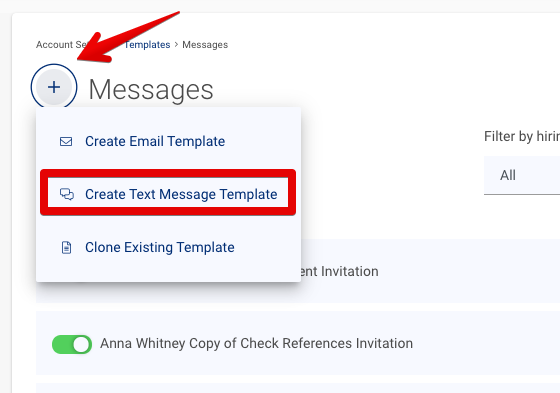
Click the **plus icon (+)** and select **Create Text Message Template**.
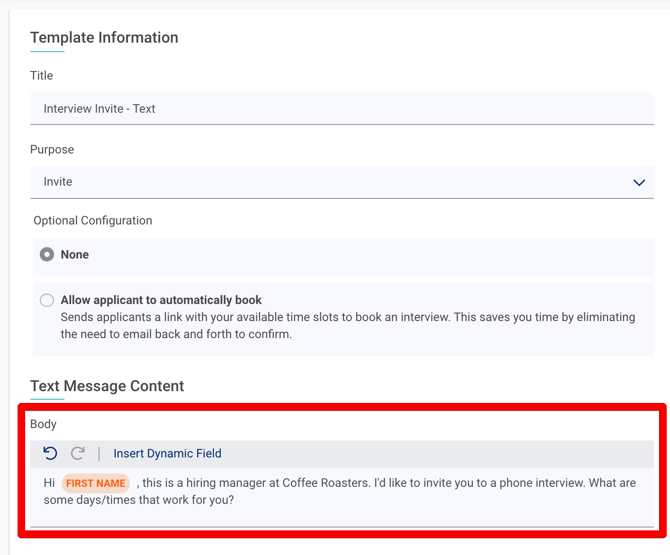
Fill out the text message template information:
- Give the template a descriptive **Title**.
- For example, "Phone Screen Invite - Text Message"
- Select the **Purpose** of the text using the drop-down menu.
- For example, to **Invite** applicants to a phone screen or **Schedule** an in-person interview.
- Type the content of the text in the **Body** section.
- [Use dynamic fields](https://adpsupport.careerplug.com/using-dynamic-fields-for-message-templates?hsLang=en) to populate the applicant's name, the job they applied to, and more.
**Tip:** Include your company name so that applicants know which company they are being contacted by.
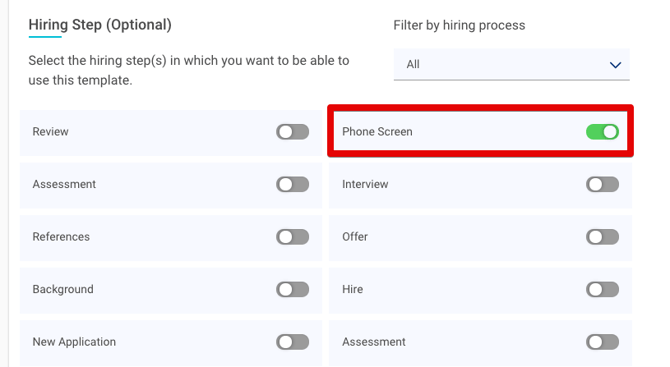
Select the hiring step(s) in which you want to be able to use this template.
You cannot add text message templates to the **New Application** step of your hiring process. Even if you turn on the toggle for that hiring step, no template will be associated.
When you use a text message template, applicants to whom you send it will automatically be advanced in the hiring process. If you text applicants without a template, they will not be automatically advanced in the hiring process.
[Here are some sample text message templates.](https://adpsupport.careerplug.com/sample-text-message-templatess?hsLang=en)
### Texting applicants using a template
To use one of your text message templates, navigate to your **Applicants** page.
%20(NavEXP)%20(Standard)%20(Cropped%2c%20pointed%20to%20applicants).png?width=670&height=199&name=Dashboard%20(6.9.26)%20(NavEXP)%20(Standard)%20(Cropped%2c%20pointed%20to%20applicants).png)
Click the **Send Invitation** button on an applicant in the Assessment, Phone Screen, Interview, or References hiring step.
%20(Nav%20bar%20minimized)%20Send%20assessments.png?width=670&height=366&name=Applicants%20page%20(6.23.26)%20(Nav%20bar%20minimized)%20Send%20assessments.png)
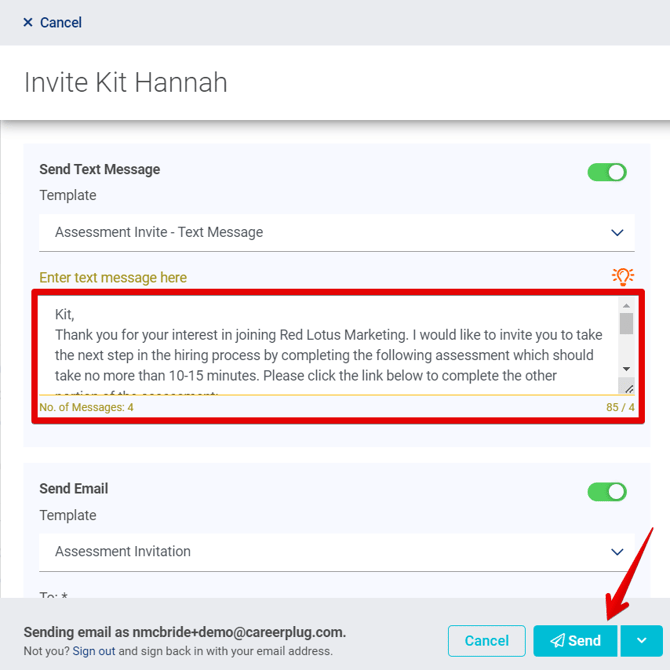
In the Invite drawer, select the text message template you want to send from the **Template** drop-down.
.png?width=502&height=499&name=Invite%20assessment%2c%20cropped%20(7.21.26).png)
If you only have one template available for the hiring step, it will be selected and pre-filled by default. We recommend cleaning up the text before clicking **Send**.
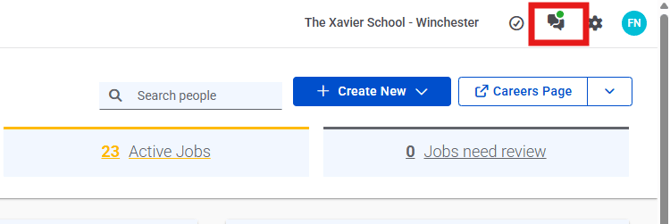
You will get responses to your text messages in your CareerPlug account. Your notifications icon will be illuminated with a green dot when you have a new text. Click the icon to view and respond to the text.
**Note:** Although you can email multiple applicants at once, you currently cannot text multiple applicants at once using a text message template. However, using text message templates does make texting an applicant quicker than typing individual texts.
- [Getting Started](https://adpsupport.careerplug.com/getting-started?hsLang=en#main-content)
- [CareerPlug 101](https://adpsupport.careerplug.com/getting-started?hsLang=en#careerplug-101)
- [How To Hire](https://adpsupport.careerplug.com/getting-started?hsLang=en#how-to-hire)
- [Account Set Up](https://adpsupport.careerplug.com/account-set-up?hsLang=en#main-content)
- [About Your Account](https://adpsupport.careerplug.com/account-set-up?hsLang=en#about-your-account)
- [Billing](https://adpsupport.careerplug.com/account-set-up?hsLang=en#billing)
- [Configuring Your Account](https://adpsupport.careerplug.com/account-set-up?hsLang=en#configuring-your-account)
- [Locations](https://adpsupport.careerplug.com/account-set-up?hsLang=en#locations)
- [Your Careers Page](https://adpsupport.careerplug.com/account-set-up?hsLang=en#your-careers-page)
- [Notifications](https://adpsupport.careerplug.com/account-set-up?hsLang=en#notifications)
- [User Access](https://adpsupport.careerplug.com/account-set-up?hsLang=en#user-access)
- [Admin](https://adpsupport.careerplug.com/account-set-up?hsLang=en#admin)
- [Support](https://adpsupport.careerplug.com/support?hsLang=en#main-content)
- [Contacting Support](https://adpsupport.careerplug.com/support?hsLang=en#contacting-support)
- [Troubleshooting](https://adpsupport.careerplug.com/support?hsLang=en#troubleshooting)
- [Live Trainings](https://adpsupport.careerplug.com/support?hsLang=en#live-trainings)
- [Job Postings](https://adpsupport.careerplug.com/job-postings?hsLang=en#main-content)
- [About Your Jobs](https://adpsupport.careerplug.com/job-postings?hsLang=en#about-your-jobs)
- [Creating & Editing Job Postings](https://adpsupport.careerplug.com/job-postings?hsLang=en#creating-editing-job-postings)
- [Sponsoring Jobs](https://adpsupport.careerplug.com/job-postings?hsLang=en#sponsoring-jobs)
- [Passive Recruiting](https://adpsupport.careerplug.com/job-postings?hsLang=en#passive-recruiting)
- [Managing Your Jobs](https://adpsupport.careerplug.com/job-postings?hsLang=en#managing-your-jobs)
- [Sharing Your Jobs](https://adpsupport.careerplug.com/job-postings?hsLang=en#sharing-your-jobs)
- [Job Boards](https://adpsupport.careerplug.com/job-postings?hsLang=en#job-boards)
- [Applicant Flow](https://adpsupport.careerplug.com/job-postings?hsLang=en#applicant-flow)
- [Applicant Tracking](https://adpsupport.careerplug.com/applicant-tracking?hsLang=en#main-content)
- [Applicant Information](https://adpsupport.careerplug.com/applicant-tracking?hsLang=en#applicant-information)
- [Managing Applicants](https://adpsupport.careerplug.com/applicant-tracking?hsLang=en#managing-applicants)
- [Sorting & Filtering Applicants](https://adpsupport.careerplug.com/applicant-tracking?hsLang=en#sorting-filtering-applicants)
- [Contacting Applicants](https://adpsupport.careerplug.com/applicant-tracking?hsLang=en#contacting-applicants)
- [Interviewing Applicants](https://adpsupport.careerplug.com/applicant-tracking?hsLang=en#interviewing-applicants)
- [Applicant Activity](https://adpsupport.careerplug.com/applicant-tracking?hsLang=en#applicant-activity)
- [Hiring](https://adpsupport.careerplug.com/applicant-tracking?hsLang=en#hiring)
- [Applicant Experience](https://adpsupport.careerplug.com/applicant-tracking?hsLang=en#applicant-experience)
- [Hiring Tools & Automations](https://adpsupport.careerplug.com/hiring-tools-automations?hsLang=en#main-content)
- [Autopilot](https://adpsupport.careerplug.com/hiring-tools-automations?hsLang=en#autopilot)
- [Hiring Process](https://adpsupport.careerplug.com/hiring-tools-automations?hsLang=en#hiring-process)
- [Automations](https://adpsupport.careerplug.com/hiring-tools-automations?hsLang=en#automations)
- [Prescreen Questions](https://adpsupport.careerplug.com/hiring-tools-automations?hsLang=en#prescreen-questions)
- [Assessments](https://adpsupport.careerplug.com/hiring-tools-automations?hsLang=en#assessments)
- [Email & Text Messages](https://adpsupport.careerplug.com/hiring-tools-automations?hsLang=en#email-text-messages)
- [Scorecards](https://adpsupport.careerplug.com/hiring-tools-automations?hsLang=en#scorecards)
- [Offer Letters](https://adpsupport.careerplug.com/hiring-tools-automations?hsLang=en#offer-letters)
- [Templates](https://adpsupport.careerplug.com/hiring-tools-automations?hsLang=en#templates)
- [Integrations](https://adpsupport.careerplug.com/hiring-tools-automations?hsLang=en#integrations)
- [Other Tools](https://adpsupport.careerplug.com/hiring-tools-automations?hsLang=en#other-tools)
- [Reporting & Compliance](https://adpsupport.careerplug.com/reporting-compliance?hsLang=en#main-content)
- [Reporting](https://adpsupport.careerplug.com/reporting-compliance?hsLang=en#reporting)
- [Charts](https://adpsupport.careerplug.com/reporting-compliance?hsLang=en#charts)
- [Compliance](https://adpsupport.careerplug.com/reporting-compliance?hsLang=en#compliance)
- [FAQs & Integrations](https://adpsupport.careerplug.com/faqs-integrations?hsLang=en#main-content)
- [The CareerPlug + ADP Partnership](https://adpsupport.careerplug.com/faqs-integrations?hsLang=en#the-careerplug-adp-partnership)
- [Integrations](https://adpsupport.careerplug.com/faqs-integrations?hsLang=en#integrations)
- [What's New](https://adpsupport.careerplug.com/whats-new?hsLang=en#main-content)
- [Monthly Updates](https://adpsupport.careerplug.com/whats-new?hsLang=en#monthly-updates)
- [Account Changes](https://adpsupport.careerplug.com/whats-new?hsLang=en#account-changes)
[](https://adpsupport.careerplug.com?hsLang=en)
Handcrafted in Austin, Texas
© 2026 CareerPlug. All rights reserved.